版本0.16.0(2015年3月22日)#
这是从0.15.2开始的一个主要版本,包括少量的API更改、几个新功能、增强功能和性能改进,以及大量的错误修复。我们建议所有用户升级到此版本。
亮点包括:
DataFrame.assignmethod, see hereSeries.to_coo/from_coomethods to interact withscipy.sparse, see here向后不兼容的更改
Timedelta为了符合.seconds具有的属性datetime.timedelta,请参见 here对
.loc切片API以符合的行为.ix看见 here中排序的默认设置的更改
Categorical构造函数,请参见 here增强了
.str访问器以使字符串操作更容易,请参见 here这个
pandas.tools.rplot,pandas.sandbox.qtpandas和pandas.rpy模块已弃用。我们向用户推荐外部包,如 seaborn , pandas-qt 和 rpy2 有关类似或等效的功能,请参见 here
检查 API Changes 和 deprecations 在更新之前。
V0.16.0中的新特性
新功能#
数据帧分配#
受 dplyr's mutate 谓词,DataFrame有一个新的 assign() 方法。的函数签名 assign 就是简单地 **kwargs 。键是新字段的列名,值是要插入的值(例如 Series 或NumPy数组),或要在 DataFrame 。插入新值,并返回整个DataFrame(包括所有原始列和新列)。
In [1]: iris = pd.read_csv('data/iris.data')

In [2]: iris.head()
Out[2]:
   SepalLength  SepalWidth  PetalLength  PetalWidth         Name
0          5.1         3.5          1.4         0.2  Iris-setosa
1          4.9         3.0          1.4         0.2  Iris-setosa
2          4.7         3.2          1.3         0.2  Iris-setosa
3          4.6         3.1          1.5         0.2  Iris-setosa
4          5.0         3.6          1.4         0.2  Iris-setosa

[5 rows x 5 columns]

In [3]: iris.assign(sepal_ratio=iris['SepalWidth'] / iris['SepalLength']).head()
Out[3]:
   SepalLength  SepalWidth  PetalLength  PetalWidth         Name  sepal_ratio
0          5.1         3.5          1.4         0.2  Iris-setosa     0.686275
1          4.9         3.0          1.4         0.2  Iris-setosa     0.612245
2          4.7         3.2          1.3         0.2  Iris-setosa     0.680851
3          4.6         3.1          1.5         0.2  Iris-setosa     0.673913
4          5.0         3.6          1.4         0.2  Iris-setosa     0.720000

[5 rows x 6 columns]
上面是一个插入预计算值的示例。我们还可以传入一个要计算的函数。
In [4]: iris.assign(sepal_ratio=lambda x: (x['SepalWidth']
   ...:                                    / x['SepalLength'])).head()
   ...:
Out[4]:
   SepalLength  SepalWidth  PetalLength  PetalWidth         Name  sepal_ratio
0          5.1         3.5          1.4         0.2  Iris-setosa     0.686275
1          4.9         3.0          1.4         0.2  Iris-setosa     0.612245
2          4.7         3.2          1.3         0.2  Iris-setosa     0.680851
3          4.6         3.1          1.5         0.2  Iris-setosa     0.673913
4          5.0         3.6          1.4         0.2  Iris-setosa     0.720000

[5 rows x 6 columns]
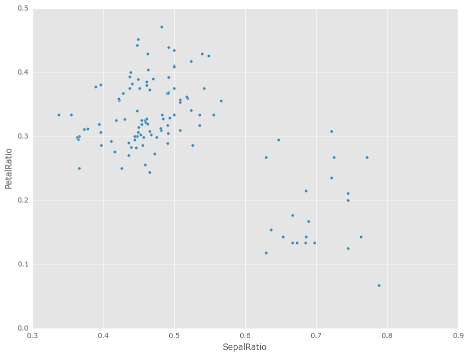
的力量 assign 在操作链中使用时出现。例如,我们可以将DataFrame限制为Sepal长度大于5的数据帧,计算比率并绘制
In [5]: iris = pd.read_csv('data/iris.data')

In [6]: (iris.query('SepalLength > 5')
   ...:      .assign(SepalRatio=lambda x: x.SepalWidth / x.SepalLength,
   ...:              PetalRatio=lambda x: x.PetalWidth / x.PetalLength)
   ...:      .plot(kind='scatter', x='SepalRatio', y='PetalRatio'))
   ...:
Out[6]: <AxesSubplot:xlabel='SepalRatio', ylabel='PetalRatio'>
请参阅 documentation 想要更多。 (GH9229 )
与Scipy.Sparse交互#
已添加 SparseSeries.to_coo() 和 SparseSeries.from_coo() 方法: (GH8048 )用于转换为 scipy.sparse.coo_matrix 实例(请参见 here )。例如,给定具有多索引的SparseSeries,我们可以将其转换为 scipy.sparse.coo_matrix 通过将行标签和列标签指定为索引级别:
s = pd.Series([3.0, np.nan, 1.0, 3.0, np.nan, np.nan])
s.index = pd.MultiIndex.from_tuples([(1, 2, 'a', 0),
                                     (1, 2, 'a', 1),
                                     (1, 1, 'b', 0),
                                     (1, 1, 'b', 1),
                                     (2, 1, 'b', 0),
                                     (2, 1, 'b', 1)],
                                    names=['A', 'B', 'C', 'D'])

s

# SparseSeries
ss = s.to_sparse()
ss

A, rows, columns = ss.to_coo(row_levels=['A', 'B'],
                             column_levels=['C', 'D'],
                             sort_labels=False)

A
A.todense()
rows
columns
From_coo方法是一种用于创建 SparseSeries 从一个 scipy.sparse.coo_matrix :
from scipy import sparse
A = sparse.coo_matrix(([3.0, 1.0, 2.0], ([1, 0, 0], [0, 2, 3])),
                      shape=(3, 4))
A
A.todense()

ss = pd.SparseSeries.from_coo(A)
ss
字符串方法增强功能#
可以通过以下方式访问以下新方法
.str访问器将函数应用于每个值。这是为了使其与字符串上的标准方法更一致。 (GH9282 , GH9352 , GH9386 , GH9387 , GH9439 )方法:
isalnum()isalpha()isdigit()isdigit()isspace()islower()isupper()istitle()isnumeric()isdecimal()find()rfind()ljust()rjust()zfill()In [7]: s = pd.Series(['abcd', '3456', 'EFGH']) In [8]: s.str.isalpha() Out[8]: 0 True 1 False 2 True Length: 3, dtype: bool In [9]: s.str.find('ab') Out[9]: 0 0 1 -1 2 -1 Length: 3, dtype: int64
Series.str.pad()和Series.str.center()现在接受fillchar用于指定填充字符的选项 (GH9352 )In [10]: s = pd.Series(['12', '300', '25']) In [11]: s.str.pad(5, fillchar='_') Out[11]: 0 ___12 1 __300 2 ___25 Length: 3, dtype: object
Added
Series.str.slice_replace(), which previously raisedNotImplementedError(GH8888)In [12]: s = pd.Series(['ABCD', 'EFGH', 'IJK']) In [13]: s.str.slice_replace(1, 3, 'X') Out[13]: 0 AXD 1 EXH 2 IX Length: 3, dtype: object # replaced with empty char In [14]: s.str.slice_replace(0, 1) Out[14]: 0 BCD 1 FGH 2 JK Length: 3, dtype: object
其他增强功能#
重新编制索引现在支持
method='nearest'对于具有单调递增或递减指数的帧或系列 (GH9258 ):In [15]: df = pd.DataFrame({'x': range(5)}) In [16]: df.reindex([0.2, 1.8, 3.5], method='nearest') Out[16]: x 0.2 0 1.8 2 3.5 4 [3 rows x 1 columns]
此方法也由较低级别公开
Index.get_indexer和Index.get_loc方法。这个
read_excel()函数的 sheetname 参数现在接受列表和None,以分别获得多张或全部图纸。如果指定了多个工作表,则返回词典。 (GH9450 )# Returns the 1st and 4th sheet, as a dictionary of DataFrames. pd.read_excel('path_to_file.xls', sheetname=['Sheet1', 3])
Allow Stata files to be read incrementally with an iterator; support for long strings in Stata files. See the docs here (GH9493:).
现在,以~开头的路径将扩展为从用户的主目录开始 (GH9066 )
Added time interval selection in
get_data_yahoo(GH9071)Added
Timestamp.to_datetime64()to complementTimedelta.to_timedelta64()(GH9255)tseries.frequencies.to_offset()现在接受Timedelta作为输入 (GH9064 )将滞后参数添加到自相关方法中
Series,默认为滞后-1自相关 (GH9192 )Timedelta现在将接受nanoseconds构造函数中的关键字 (GH9273 )SQL代码现在可以安全地转义表名和列名 (GH8986 )
Added auto-complete for
Series.str.<tab>,Series.dt.<tab>andSeries.cat.<tab>(GH9322)Index.get_indexer现在支持method='pad'和method='backfill'即使对于任何目标阵列,而不仅仅是单调目标。这些方法同样适用于单调递减指数和单调递增指数 (GH9258 )。Index.asof现在适用于所有索引类型 (GH9258 )。A
verbose在中增加了论点io.read_excel(),默认为False。设置为True可在分析工作表名称时打印它们。 (GH9450 )Added
days_in_month(compatibility aliasdaysinmonth) property toTimestamp,DatetimeIndex,Period,PeriodIndex, andSeries.dt(GH9572)已添加
decimal选项输入to_csv要为非‘’提供格式设置,请执行以下操作小数分隔符 (GH781 )已添加
normalize选项用于Timestamp归一化到午夜 (GH8794 )添加了以下示例
DataFrame使用HDF5文件导入到R,并rhdf5类库。请参阅 documentation 了解更多信息 (GH9636 )。
向后不兼容的API更改#
时间增量的变化#
在v0.15.0中,一个新的标量类型 Timedelta 被引入,那是一个子类 datetime.timedelta 。提过 here 是API更改的通知w.r.t.这个 .seconds 访问者。其目的是提供一组用户友好的访问器,这些访问器给出该单元的“自然”值,例如,如果您有 Timedelta('1 day, 10:11:12') ,那么 .seconds 将返回12。但是,这与 datetime.timedelta ,它定义了 .seconds 作为 10 * 3600 + 11 * 60 + 12 == 36672 。
因此,在v0.16.0中,我们将API恢复为与 datetime.timedelta 。此外,组件值仍可通过 .components 访问者。这会影响 .seconds 和 .microseconds 访问器,并删除 .hours , .minutes , .milliseconds 存取器。这些变化会影响 TimedeltaIndex 和系列剧 .dt 访问者也是如此。 (GH9185 , GH9139 )
以前的行为
In [2]: t = pd.Timedelta('1 day, 10:11:12.100123')

In [3]: t.days
Out[3]: 1

In [4]: t.seconds
Out[4]: 12

In [5]: t.microseconds
Out[5]: 123
新行为
In [17]: t = pd.Timedelta('1 day, 10:11:12.100123')

In [18]: t.days
Out[18]: 1

In [19]: t.seconds
Out[19]: 36672

In [20]: t.microseconds
Out[20]: 100123
使用 .components 允许完整组件访问
In [21]: t.components
Out[21]: Components(days=1, hours=10, minutes=11, seconds=12, milliseconds=100, microseconds=123, nanoseconds=0)

In [22]: t.components.seconds
Out[22]: 12
为更改编制索引#
使用的一小部分边缘情况的行为 .loc 已经改变了 (GH8613 )。此外,我们还改进了引发的错误消息的内容:
切片使用
.loc现在允许在索引中找不到开始和/或停止界限;这以前会引发KeyError。这使行为与.ix在这种情况下。此更改仅适用于切片,不适用于使用单个标签编制索引时。In [23]: df = pd.DataFrame(np.random.randn(5, 4), ....: columns=list('ABCD'), ....: index=pd.date_range('20130101', periods=5)) ....: In [24]: df Out[24]: A B C D 2013-01-01 0.469112 -0.282863 -1.509059 -1.135632 2013-01-02 1.212112 -0.173215 0.119209 -1.044236 2013-01-03 -0.861849 -2.104569 -0.494929 1.071804 2013-01-04 0.721555 -0.706771 -1.039575 0.271860 2013-01-05 -0.424972 0.567020 0.276232 -1.087401 [5 rows x 4 columns] In [25]: s = pd.Series(range(5), [-2, -1, 1, 2, 3]) In [26]: s Out[26]: -2 0 -1 1 1 2 2 3 3 4 Length: 5, dtype: int64
以前的行为
In [4]: df.loc['2013-01-02':'2013-01-10']
KeyError: 'stop bound [2013-01-10] is not in the [index]'

In [6]: s.loc[-10:3]
KeyError: 'start bound [-10] is not the [index]'
新行为
In [27]: df.loc['2013-01-02':'2013-01-10']
Out[27]:
                   A         B         C         D
2013-01-02  1.212112 -0.173215  0.119209 -1.044236
2013-01-03 -0.861849 -2.104569 -0.494929  1.071804
2013-01-04  0.721555 -0.706771 -1.039575  0.271860
2013-01-05 -0.424972  0.567020  0.276232 -1.087401

[4 rows x 4 columns]

In [28]: s.loc[-10:3]
Out[28]:
-2    0
-1    1
 1    2
 2    3
 3    4
Length: 5, dtype: int64
允许对以下对象的整数索引使用类似浮点值的切片
.ix。以前,此功能仅为.loc:以前的行为
In [8]: s.ix[-1.0:2]
TypeError: the slice start value [-1.0] is not a proper indexer for this index type (Int64Index)
新行为
In [2]: s.ix[-1.0:2]
Out[2]:
-1    1
 1    2
 2    3
dtype: int64
时,为该索引的无效类型的索引提供有用的异常
.loc。例如,试图使用.loc在类型的索引上DatetimeIndex或PeriodIndex或TimedeltaIndex,带有一个整数(或浮点数)。以前的行为
In [4]: df.loc[2:3]
KeyError: 'start bound [2] is not the [index]'
新行为
In [4]: df.loc[2:3]
TypeError: Cannot do slice indexing on <class 'pandas.tseries.index.DatetimeIndex'> with <type 'int'> keys
绝对的变化#
在以前的版本中, Categoricals 它有一个未指明的顺序(意味着没有 ordered 关键字已传递)默认为 ordered 一目了然。展望未来, ordered 中的关键字 Categorical 构造函数将默认为 False 。现在,排序必须是明确的。
而且,之前你 可能 更改 ordered 属性,只需设置属性即可,例如 cat.ordered=True ;它现在已弃用,您应该使用 cat.as_ordered() 或 cat.as_unordered() 。默认情况下,这些函数将返回 new 对象,而不修改现有对象。 (GH9347 , GH9190 )
以前的行为
In [3]: s = pd.Series([0, 1, 2], dtype='category')

In [4]: s
Out[4]:
0    0
1    1
2    2
dtype: category
Categories (3, int64): [0 < 1 < 2]

In [5]: s.cat.ordered
Out[5]: True

In [6]: s.cat.ordered = False

In [7]: s
Out[7]:
0    0
1    1
2    2
dtype: category
Categories (3, int64): [0, 1, 2]
新行为
In [29]: s = pd.Series([0, 1, 2], dtype='category')

In [30]: s
Out[30]:
0    0
1    1
2    2
Length: 3, dtype: category
Categories (3, int64): [0, 1, 2]

In [31]: s.cat.ordered
Out[31]: False

In [32]: s = s.cat.as_ordered()

In [33]: s
Out[33]:
0    0
1    1
2    2
Length: 3, dtype: category
Categories (3, int64): [0 < 1 < 2]

In [34]: s.cat.ordered
Out[34]: True

# you can set in the constructor of the Categorical
In [35]: s = pd.Series(pd.Categorical([0, 1, 2], ordered=True))

In [36]: s
Out[36]:
0    0
1    1
2    2
Length: 3, dtype: category
Categories (3, int64): [0 < 1 < 2]

In [37]: s.cat.ordered
Out[37]: True
为了便于创建一系列分类数据,我们添加了在调用时传递关键字的功能 .astype() 。它们被直接传递给构造函数。
In [54]: s = pd.Series(["a", "b", "c", "a"]).astype('category', ordered=True)

In [55]: s
Out[55]:
0    a
1    b
2    c
3    a
dtype: category
Categories (3, object): [a < b < c]

In [56]: s = (pd.Series(["a", "b", "c", "a"])
   ....:        .astype('category', categories=list('abcdef'), ordered=False))

In [57]: s
Out[57]:
0    a
1    b
2    c
3    a
dtype: category
Categories (6, object): [a, b, c, d, e, f]
其他API更改#
Index.duplicated现在返回np.array(dtype=bool)而不是Index(dtype=object)包含bool价值。 (GH8875 )DataFrame.to_json现在为混合数据类型帧的每一列返回准确的类型序列化 (GH9037 )以前,数据在序列化之前被强制为通用数据类型,例如,这会导致将整数序列化为浮点数:
In [2]: pd.DataFrame({'i': [1,2], 'f': [3.0, 4.2]}).to_json()
Out[2]: '{"f":{"0":3.0,"1":4.2},"i":{"0":1.0,"1":2.0}}'
现在,每列都使用其正确的数据类型进行了序列化:
In [2]:  pd.DataFrame({'i': [1,2], 'f': [3.0, 4.2]}).to_json()
Out[2]: '{"f":{"0":3.0,"1":4.2},"i":{"0":1,"1":2}}'
DatetimeIndex,PeriodIndex和TimedeltaIndex.summary现在输出相同的格式。 (GH9116 )TimedeltaIndex.freqstr现在输出与以下相同的字符串格式DatetimeIndex。 (GH9116 )条形图和水平条形图不再沿信息轴添加虚线。之前的风格可以通过matplotlib的
axhline或axvline方法: (GH9088 )。Series访问者.dt,.cat和.str现在举起AttributeError而不是TypeError如果该系列不包含适当类型的数据 (GH9617 )。这更紧密地遵循了Python的内置异常层次结构,并确保了像hasattr(s, 'cat')在Python2和3上都是一致的。Series现在支持整型的按位运算 (GH9016 )。以前,即使输入数据类型是整型的,输出数据类型也被强制为bool。以前的行为
In [2]: pd.Series([0, 1, 2, 3], list('abcd')) | pd.Series([4, 4, 4, 4], list('abcd'))
Out[2]:
a    True
b    True
c    True
d    True
dtype: bool
新的行为。如果输入数据类型是整型的,则输出数据类型也是整型的,并且输出值是按位运算的结果。
In [2]: pd.Series([0, 1, 2, 3], list('abcd')) | pd.Series([4, 4, 4, 4], list('abcd'))
Out[2]:
a    4
b    5
c    6
d    7
dtype: int64
在分组表决期间,涉及
Series或DataFrame,0/0和0//0现在给我np.nan而不是np.inf。 (GH9144 , GH8445 )以前的行为
In [2]: p = pd.Series([0, 1])

In [3]: p / 0
Out[3]:
0    inf
1    inf
dtype: float64

In [4]: p // 0
Out[4]:
0    inf
1    inf
dtype: float64
新行为
In [38]: p = pd.Series([0, 1])

In [39]: p / 0
Out[39]:
0    NaN
1    inf
Length: 2, dtype: float64

In [40]: p // 0
Out[40]:
0    NaN
1    inf
Length: 2, dtype: float64
Series.values_counts和Series.describe对于分类数据,现在将把NaN结尾处的条目。 (GH9443 )Series.describe因为分类数据现在给出的计数和频率为0,而不是NaN,用于未使用的类别 (GH9443 )由于错误修复,使用以下命令查找部分字符串标签
DatetimeIndex.asof现在包括与字符串匹配的值,即使它们在部分字符串标签的开始之后 (GH9258 )。旧行为:
In [4]: pd.to_datetime(['2000-01-31', '2000-02-28']).asof('2000-02')
Out[4]: Timestamp('2000-01-31 00:00:00')
已修复行为:
In [41]: pd.to_datetime(['2000-01-31', '2000-02-28']).asof('2000-02')
Out[41]: Timestamp('2000-02-28 00:00:00')
要再现旧的行为,只需向标注添加更多精确度(例如,使用
2000-02-01而不是2000-02)。
不推荐使用#
这个
rplottrellis plotting interface is deprecated and will be removed in a future version. We refer to external packages like seaborn for similar but more refined functionality (GH3445). The documentation includes some examples how to convert your existing code fromrplotto seaborn here 。这个
pandas.sandbox.qtpandas接口已弃用,并将在未来版本中删除。我们向用户推荐外部包 pandas-qt 。 (GH9615 )添加
DatetimeIndex/PeriodIndex给另一个人DatetimeIndex/PeriodIndex作为集合运算被弃用。这将更改为TypeError在未来的版本中。.union()应用于并集运算。 (GH9094 )减法
DatetimeIndex/PeriodIndex从另一个人DatetimeIndex/PeriodIndex作为集合运算被弃用。这将更改为实际的数字减法,从而产生TimeDeltaIndex在未来的版本中。.difference()应用于差分集操作。 (GH9094 )
删除先前版本的弃用/更改#
DataFrame.pivot_tableandcrosstab'srowsandcolskeyword arguments were removed in favor ofindexandcolumns(GH6581)DataFrame.to_excelandDataFrame.to_csvcolskeyword argument was removed in favor ofcolumns(GH6581)Removed
convert_dummiesin favor ofget_dummies(GH6581)Removed
value_rangein favor ofdescribe(GH6581)
性能改进#
修复了以下项的性能回归
.loc使用数组或类似列表的索引 (GH9126 :)。DataFrame.to_json混合数据类型帧的性能提高30倍。 (GH9037 )在以下方面的性能改进
MultiIndex.duplicated通过使用标签而不是值 (GH9125 )Improved the speed of
nuniqueby callinguniqueinstead ofvalue_counts(GH9129, GH7771)性能提升多达10倍
DataFrame.count和DataFrame.dropna通过适当地利用同构/异类数据类型 (GH9136 )性能提升高达20倍
DataFrame.count在使用MultiIndex以及level关键字参数 (GH9163 )中的性能和内存使用率改进
merge当密钥空间超过int64边界 (GH9151 )Performance improvements in multi-key
groupby(GH9429)Performance improvements in
MultiIndex.sortlevel(GH9445)Performance and memory usage improvements in
DataFrame.duplicated(GH9398)Cythonized
Period(GH9440)Decreased memory usage on
to_hdf(GH9648)
错误修复#
变化
.to_html删除表体中的前导/尾随空格 (GH4987 )修复了使用
read_csv在S3上使用PYTHON 3 (GH9452 )Fixed compatibility issue in
DatetimeIndexaffecting architectures wherenumpy.int_defaults tonumpy.int32(GH8943)使用类似对象的面板索引时出现错误 (GH9140 )
返回的代码中存在错误
Series.dt.components索引已重置为默认索引 (GH9247 )窃听
Categorical.__getitem__/__setitem__Listlike输入从索引器强制获得不正确的结果 (GH9469 )DatetimeIndex的部分设置中存在错误 (GH9478 )
应用聚合器时,整数和日期64列的GROUPBY中存在错误,该聚合器导致在数字足够大时更改了值 (GH9311 , GH6620 )
修复了中的错误
to_sql当映射到Timestamp对象列(具有时区信息的DateTime列)设置为适当的SQLalChemy类型 (GH9085 )。修复了中的错误
to_sqldtype参数不接受实例化的SQLAlChemy类型 (GH9083 )。Bug in
.locpartial setting with anp.datetime64(GH9516)在类似日期时间的外观上推断的数据类型不正确
Series启用(&ON).xs切片 (GH9477 )中的项目
Categorical.unique()(及s.unique()如果s是数据类型category)现在以最初找到它们的顺序显示,而不是按排序顺序显示 (GH9331 )。这与大Pandas其他d型的行为现在是一致的。Fixed bug on big endian platforms which produced incorrect results in
StataReader(GH8688).窃听
MultiIndex.has_duplicates当具有多个级别导致索引器溢出时 (GH9075 , GH5873 )窃听
pivot和unstack哪里nan值将破坏索引对齐 (GH4862 , GH7401 , GH7403 , GH7405 , GH7466 , GH9497 )左边的臭虫
join关于多重索引与sort=True或空值 (GH9210 )。窃听
MultiIndex插入新密钥将失败的位置 (GH9250 )。窃听
groupby当密钥空间超过int64边界 (GH9096 )。窃听
unstack使用TimedeltaIndex或DatetimeIndex和空值 (GH9491 )。窃听
rank将浮点数与容差进行比较会导致行为不一致的情况 (GH8365 )。修复了中的字符编码错误
read_stata和StataReader从URL加载数据时 (GH9231 )。Bug in adding
offsets.Nanoto other offsets raisesTypeError(GH9284)虫子进来了
resample在夏令时前后。这需要修复偏移类,以便它们在DST过渡时正确运行。 (GH5172 , GH8744 , GH8653 , GH9173 , GH9468 )。二元运算符方法中的错误(例如
.mul())与整数级别对齐 (GH9463 )。箱图、散点图和六箱图中的错误可能会显示不必要的警告 (GH8877 )
子情节中的错误
layoutKW可能会显示不必要的警告 (GH9464 )在使用包装函数(例如,轴)时,使用需要传递参数(例如轴)的分组函数时出现错误。
fillna), (GH9221 )DataFrame现在适当地支持同步copy和dtype构造函数中的参数 (GH9099 )窃听
read_csv在带有CR行结尾的文件上使用skipprow时,请使用c引擎。 (GH9079 )isnullnow detectsNaTinPeriodIndex(GH9129)Groupby中的错误
.nth()具有多列分组依据 (GH8979 )窃听
DataFrame.where和Series.where将数字强制为错误字符串 (GH9280 )窃听
DataFrame.where和Series.where加薪ValueError当传递类似字符串列表的时候。 (GH9280 )访问
Series.str使用非字符串值的方法现在会引发TypeError而不是产生不正确的结果 (GH9184 )窃听
DatetimeIndex.__contains__当索引有重复且不是单调递增时 (GH9512 )修复了以下项的零除错误
Series.kurt()当所有值相等时 (GH9197 )已修复的问题
xlsxwriter在该引擎中,如果未应用其他格式,则会向单元格添加默认的“常规”格式。这会阻止应用其他行或列格式。 (GH9167 )修复了的问题
index_col=False什么时候usecols中也指定了read_csv。 (GH9082 )BUG在哪里
wide_to_long将修改输入存根名称列表 (GH9204 )窃听
to_sql不使用双精度存储Float64值。 (GH9009 )SparseSeries和SparsePanel现在接受零参数构造函数(与它们的非稀疏对应函数相同) (GH9272 )。合并中的回归
Categorical和object数据类型 (GH9426 )窃听
read_csv带有某些格式错误的输入文件的缓冲区溢出 (GH9205 )修复了中的错误
Series.groupby在哪里分组MultiIndex级别将忽略排序参数 (GH9444 )修复错误
DataFrame.Groupby哪里sort=False在分类列的情况下被忽略。 (GH8868 )修复了从Python3上的Amazon S3读取CSV文件时引发TypeError的错误 (GH9452 )
Google BigQuery阅读器中的错误,其中‘jobComplete’键可能存在,但在查询结果中为假 (GH8728 )
Bug in
Series.values_countswith excludingNaNfor categorical typeSerieswithdropna=True(GH9443)Fixed missing numeric_only option for
DataFrame.std/var/sem(GH9201)支架施工
Panel或Panel4D使用标量数据 (GH8285 )Seriestext representation disconnected frommax_rows/max_columns(GH7508).
Series截断时数字格式不一致 (GH8532 )。以前的行为
In [2]: pd.options.display.max_rows = 10
In [3]: s = pd.Series([1,1,1,1,1,1,1,1,1,1,0.9999,1,1]*10)
In [4]: s
Out[4]:
0    1
1    1
2    1
...
127    0.9999
128    1.0000
129    1.0000
Length: 130, dtype: float64
新行为
0      1.0000
1      1.0000
2      1.0000
3      1.0000
4      1.0000
...
125    1.0000
126    1.0000
127    0.9999
128    1.0000
129    1.0000
dtype: float64
一个伪造品
SettingWithCopy在某些情况下,在框架中设置新项目时会生成警告 (GH8730 )以下代码以前会报告一个
SettingWithCopy警告。In [42]: df1 = pd.DataFrame({'x': pd.Series(['a', 'b', 'c']), ....: 'y': pd.Series(['d', 'e', 'f'])}) ....: In [43]: df2 = df1[['x']] In [44]: df2['y'] = ['g', 'h', 'i']
贡献者#
共有60人为此次发布贡献了补丁。名字中带有“+”的人第一次贡献了一个补丁。
Aaron Toth +
Alan Du +
Alessandro Amici +
Artemy Kolchinsky
Ashwini Chaudhary +
Ben Schiller
Bill Letson
Brandon Bradley +
Chau Hoang +
Chris Reynolds
Chris Whelan +
Christer van der Meeren +
David Cottrell +
David Stephens
Ehsan Azarnasab +
Garrett-R +
Guillaume Gay
Jake Torcasso +
Jason Sexauer
Jeff Reback
John McNamara
Joris Van den Bossche
Joschka zur Jacobsmühlen +
Juarez Bochi +
Junya Hayashi +
K.-Michael Aye
Kerby Shedden +
Kevin Sheppard
Kieran O'Mahony
Kodi Arfer +
Matti Airas +
Min RK +
Mortada Mehyar
Robert +
Scott E Lasley
Scott Lasley +
Sergio Pascual +
Skipper Seabold
Stephan Hoyer
Thomas Grainger
Tom Augspurger
TomAugspurger
Vladimir Filimonov +
Vyomkesh Tripathi +
Will Holmgren
Yulong Yang +
behzad nouri
bertrandhaut +
bjonen
cel4 +
clham
hsperr +
ischwabacher
jnmclarty
josham +
jreback
omtinez +
roch +
sinhrks
unutbu