2.9. WCS-栅格 Web 服务#
2.9.1. 概述#
WCS(OpenGIS® Web Coverage Service)当前版本是 1.1.2。WCS 标准定义了一些操作, 这些操作允许用户访问“Coverage”数据,如卫星影像、数字高程数据等,也就是栅格数据。
2.9.2. WCS 的操作#
WCS 包括以下 3 个操作:
1.GetCapabilities(获取服务的元信息)
2.DescribeCoverage(获取 Coverage 的描述信息)
3.GetCoverage(获取Coverage)关于服务涉及的基本元素,可以参考前面的章节:《服务涉及的基本元素》。
2.9.3. GetCapabilities 操作#
1. KVP 格式请求#
GetCapabilities 操作需要以下的参数:
参数 |
是否必须 |
默认值 |
SERVICE |
是 |
WCS |
REQUEST=GetCapabilities |
是 |
|
ACCEPTVERSIONS |
||
SECTIONS |
||
UPDATESEQUENCE |
||
ACCEPTFORMATS |
以下是一个WCS使用KVP格式的GetCapabilities操作示例:
http://hostname:port/path?
service=WCS&
request=GetCapabilities
2.XML格式请求#
以下是一个WCS使用XML格式的GetCapabilities操作示例:
xml version="1.0" encoding="UTF-8"?>
<
GetCapabilities
 xmlns
="http://www.opengis.net/wcs/1.1.1"
xmlns
:xsi
="http://www.w3.org/2001/XMLSchema-instance"
xsi
:schemaLocation
="http://www.opengis.net/wcs/1.1.1 ../wcsGetCapabilities.xsd"
service
="WCS"  />
3.响应示例#
以下是一个WCS的GetCapabilities操作的响应示例:
xml version="1.0" encoding="UTF-8"?>
<wcs
:Capabilities
 xmlns
="http://www.opengis.net/wcs/1.1"
xmlns
:ows
="http://www.opengis.net/ows/1.1"
 xmlns
:xsi
="http://www.w3.org/2001/XMLSchema-instance"

xsi
:schemaLocation
="http://www.opengis.net/wcs/1.1 ../wcsDescribeCoverage.xsd http://www.opengis.net/ows/1.1 ../../../ows/1.1.0/owsAll.xsd"
>
<
ows
:ServiceIdentification
>
<
ows
:Title
>
Web Coverage Serviceows
:Title
>
<
ows
:Abstract
>
WCSows
:Abstract
>
<
ows
:ServiceType
>
WCSows
:ServiceType
>


<
ows
:AccessConstraints
>
NONEows
:AccessConstraints
>


ows
:ServiceIdentification
>


<
ows
:OperationsMetadata
>


<
ows
:Operation
 name
="GetCapabilities"
>


...

ows
:Operation
>


<
ows
:Operation
 name
="DescribeCoverage"
>


...

ows
:Operation
>


<
ows
:Operation
 name
="GetCoverage"
>


...

ows
:Operation
>


<
ows
:Constraint
 name
="PostEncoding"
>


<
ows
:AllowedValues
>


<
ows
:Value
>
XMLows
:Value
>


ows
:AllowedValues
>


ows
:Constraint
>


ows
:OperationsMetadata
>


<
wcs
:Contents
>


...

wcs
:Contents
>


wcs
:Capabilities
>
2.9.4. DescribeCoverage 操作#
1. KVP 格式请求#
DescribeCoverage 操作需要以下的参数:
参数 |
是否必须 |
默认值 |
VERSION |
是 |
1.1.2 |
SERVICE |
是 |
WCS |
REQUEST=DescribeCoverage |
是 |
|
IDENTIFIERS |
是 |
以下是一个WCS使用KVP格式的DescribeCoverage操作示例:
http://server_address/path/script?
service=WCS &
request=DescribeCoverage&
version=1.1.2 &
identifiers=Cov1,Cov2,Cov3
2.XML格式请求#
以下是一个WCS使用XML格式的DescribeCoverage操作示例:
xml version="1.0" encoding="UTF-8"?>
<
DescribeCoverage
 xmlns
="http://www.opengis.net/wcs/1.1"

xmlns
:xsi
="http://www.w3.org/2001/XMLSchema-instance"


xsi
:schemaLocation
="http://www.opengis.net/wcs/1.1 ../wcsDescribeCoverage.xsd"


service
="WCS"
 version
="1.1.2"
>


<
Identifier
>
Cov1Identifier
>


<
Identifier
>
Cov2Identifier
>


<
Identifier
>
Cov3Identifier
>


DescribeCoverage
>
3.响应示例#
以下是一个WCS的DescribeCoverage操作的响应示例:
xml version="1.0" encoding="UTF-8"?>


<
CoverageDescriptions
 xmlns
="http://www.opengis.net/wcs/1.1"


xmlns
:ows
="http://www.opengis.net/ows/1.1"
 xmlns
:xsi
="http://www.w3.org/2001/XMLSchema-instance"


xsi
:schemaLocation
="http://www.opengis.net/wcs/1.1 ../wcsDescribeCoverage.xsd http://www.opengis.net/ows/1.1 ../../../ows/1.1.0/owsAll.xsd"
>


<
CoverageDescription
>


<
ows
:Title
>
TBDows
:Title
>


<
ows
:Abstract
>
TBDows
:Abstract
>


<
Identifier
>
TBDIdentifier
>


<
Domain
>


<
SpatialDomain
>


<
ows
:BoundingBox
>


<
ows
:LowerCorner
>
-30.00 -30.00ows
:LowerCorner
>


<
ows
:UpperCorner
>
30.00 30.00ows
:UpperCorner
>


ows
:BoundingBox
>


SpatialDomain
>


Domain
>


<
Range
>


<
Field
>


<
ows
:Title
>
TBDows
:Title
>


<
ows
:Abstract
>
TBDows
:Abstract
>


<
Identifier
>
TBDIdentifier
>


<
Definition
>


<
ows
:AnyValue
 />


Definition
>


<
InterpolationMethods
>


<
InterpolationMethod
>
linearInterpolationMethod
>


<
Default
>
cubicDefault
>


InterpolationMethods
>


Field
>


Range
>


<
SupportedCRS
>
urn:ogc:def:crs:EPSG::XXXX

SupportedCRS
>


<
SupportedCRS
>
urn:ogc:def:crs:EPSG::YYYY

SupportedCRS
>


<
SupportedFormat
>
text/xmlSupportedFormat
>


CoverageDescription
>


CoverageDescriptions
>
2.9.5. GetCoverage 操作#
1. KVP 格式请求#
GetCoverage 操作需要以下的参数:
参数 |
是否必须 |
默认值 |
VERSION |
是 |
1.1.2 |
SERVICE |
是 |
WCS |
REQUEST=GetCoverage |
是 |
|
IDENTIFIER |
是 |
|
BOUNDINGBOX |
是 |
|
FORMAT |
是 |
|
TIMESEQUENCE |
||
RANGESUBSET |
||
STORE |
||
GRIDBASECRS |
||
GRIDTYPE |
||
GRIDCS |
||
GRIDORIGIN |
||
GRIDOFFSETS |
以下是一个WCS使用KVP格式的GetCoverage操作示例:
http://my.service.org/path/script?
service=WCS&
version=1.1.2&
request=GetCoverage&
identifier=Cov123&
BoundingBox=-71,47,-66,51,urn:ogc:def:crs:OGC:2:84&
format=image/netcdf
2.XML格式请求#
以下是一个WCS使用XML格式的GetCoverage操作示例:
xml version="1.0" encoding="UTF-8"?>

GetCoverage xmlns="http://www.opengis.net/wcs/1.1"

xmlns:ows="http://www.opengis.net/ows/1.1" xmlns:xsi="http://www.w3.org/2001/XMLSchema-instance"

xsi:schemaLocation="http://www.opengis.net/wcs/1.1 ../wcsGetCoverage.xsd"

service="WCS" version="1.1.2">

ows:Identifier>Cov123ows:Identifier>

DomainSubset>

ows:BoundingBox crs="urn:ogc:def:crs:OGC:2:84">

ows:LowerCorner>-71 47ows:LowerCorner>

ows:UpperCorner>-66 51ows:UpperCorner>

ows:BoundingBox>

DomainSubset>

Output format="image/netcdf" />

GetCoverage>
3.响应示例#
以下是一个WCS的GetCoverage操作的响应示例:
xml version="1.0" encoding="UTF-8"?>

Coverages xmlns="http://www.opengis.net/wcs/1.1" xmlns:ows="http://www.opengis.net/ows"

xmlns:xlink="http://www.w3.org/1999/xlink" xmlns:xsi="http://www.w3.org/2001/XMLSchema-instance"

xmlns:schemaLocation="http://www.opengis.net/wcs/1.1 ../owsCoverages.xsd http://www.opengis.net/ows/1.1 ../../../ows/1.1.0/owsAll.xsd">

Coverage>

ows:Title>TBDows:Title>

ows:Abstract>Coverage created from GetCoverage operation

request to a WCSows:Abstract>

Identifier>TBDIdentifier>

Reference xlink:href="http://my.server.com/coverage/image.tiff"

xlink:role="urn:ogc:def:role:WCS:1.1:coverage" />

Reference xlink:href="http://my.server.com/coverage/metadata.xml"

xlink:role="urn:ogc:def:role:WCS:1.1:metadata" />

Coverage>

Coverages>
2.9.6. ArcGIS Server 对 WCS 的支持#
ArcGIS Server 10 中支持的 WCS 版本为1.0.0 [19] 。在 ArcGIS Server中,叧需简单地勾选的 Capabilities 选项卡中可以选择支持 WCS,如图 22。
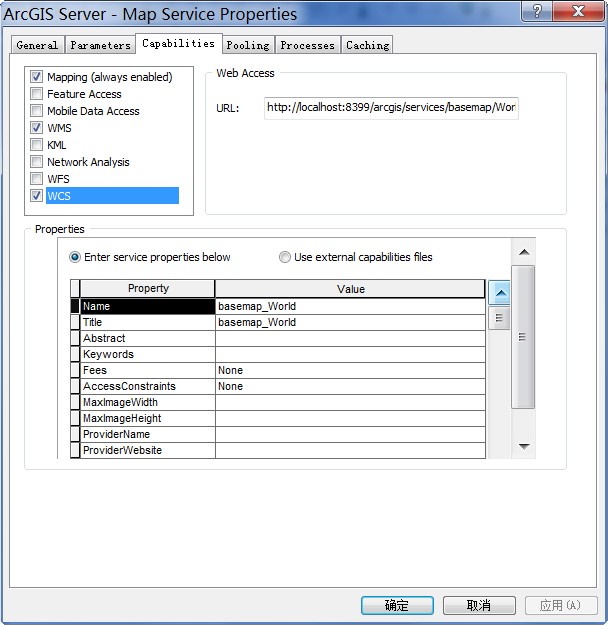
图 22 ArcGIS Server 发布 WCS 服务
现在我们通过浏觅器直接发送请求获取栅格数据,返回格式选择 GeoTIFF:
http://localhost:8399/arcgis/services/basemap/World/MapServer/WCSServer?
version=1.0.0&request=GetCoverage&service=WCS&
crs=EPSG:4326&bbox=-180,-90,180,90&
width=720&height=360&
format=geotiff&
coverage=1
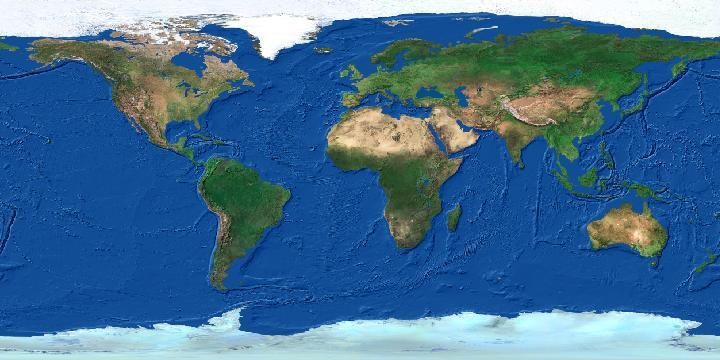
这个请求将会返回如下的结果: