随意放置硬币,但要远离墙壁和其他硬币#
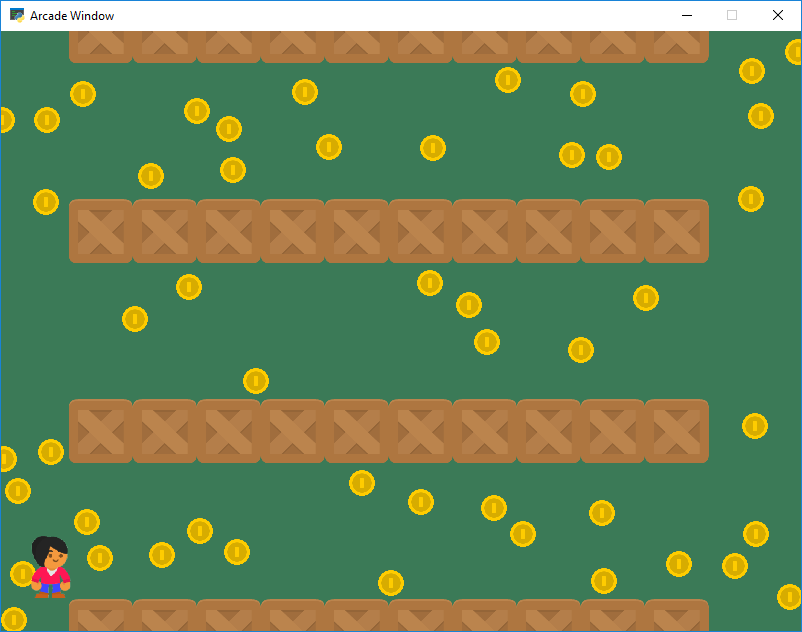
sprite_no_coins_on_walls.py#
1 2 3 4 5 6 7 8 9 10 11 12 13 14 15 16 17 18 19 20 21 22 23 24 25 26 27 28 29 30 31 32 33 34 35 36 37 38 39 40 41 42 43 44 45 46 47 48 49 50 51 52 53 54 55 56 57 58 59 60 61 62 63 64 65 66 67 68 69 70 71 72 73 74 75 76 77 78 79 80 81 82 83 84 85 86 87 88 89 90 91 92 93 94 95 96 97 98 99 100 101 102 103 104 105 106 107 108 109 110 111 112 113 114 115 116 117 118 119 120 121 122 123 124 125 126 127 128 129 130 131 132 133 134 135 136 137 138 139 140 141 142 143 144 145 146 147 148 149 150 151 152 153 154 155 156 157 158 159 160 161 162 163 164 | """ No coins on the walls Simple program to show basic sprite usage. Specifically, create coin sprites that aren't on top of any walls, and don't have coins on top of each other. Artwork from https://kenney.nl If Python and Arcade are installed, this example can be run from the command line with: python -m arcade.examples.sprite_no_coins_on_walls """ import arcade import random import os SPRITE_SCALING = 0.5 SPRITE_SCALING_COIN = 0.2 SCREEN_WIDTH = 800 SCREEN_HEIGHT = 600 SCREEN_TITLE = "Sprite No Coins on Walls Example" NUMBER_OF_COINS = 50 MOVEMENT_SPEED = 5 class MyGame(arcade.Window): """ Main application class. """ def __init__(self, width, height, title): """ Initializer """ super().__init__(width, height, title) # Set the working directory (where we expect to find files) to the same # directory this .py file is in. You can leave this out of your own # code, but it is needed to easily run the examples using "python -m" # as mentioned at the top of this program. file_path = os.path.dirname(os.path.abspath(__file__)) os.chdir(file_path) # Sprite lists self.all_sprites_list = None self.coin_list = None # Set up the player self.player_sprite = None self.wall_list = None self.physics_engine = None def setup(self): """ Set up the game and initialize the variables. """ # Sprite lists self.all_sprites_list = arcade.SpriteList() self.wall_list = arcade.SpriteList() self.coin_list = arcade.SpriteList() # Set up the player self.player_sprite = arcade.Sprite(":resources:images/animated_characters/female_person/femalePerson_idle.png", SPRITE_SCALING) self.player_sprite.center_x = 50 self.player_sprite.center_y = 64 # -- Set up the walls # Create a series of horizontal walls for y in range(0, 800, 200): for x in range(100, 700, 64): wall = arcade.Sprite(":resources:images/tiles/boxCrate_double.png", SPRITE_SCALING) wall.center_x = x wall.center_y = y self.wall_list.append(wall) # -- Randomly place coins where there are no walls # Create the coins for i in range(NUMBER_OF_COINS): # Create the coin instance # Coin image from kenney.nl coin = arcade.Sprite(":resources:images/items/coinGold.png", SPRITE_SCALING_COIN) # --- IMPORTANT PART --- # Boolean variable if we successfully placed the coin coin_placed_successfully = False # Keep trying until success while not coin_placed_successfully: # Position the coin coin.center_x = random.randrange(SCREEN_WIDTH) coin.center_y = random.randrange(SCREEN_HEIGHT) # See if the coin is hitting a wall wall_hit_list = arcade.check_for_collision_with_list(coin, self.wall_list) # See if the coin is hitting another coin coin_hit_list = arcade.check_for_collision_with_list(coin, self.coin_list) if len(wall_hit_list) == 0 and len(coin_hit_list) == 0: # It is! coin_placed_successfully = True # Add the coin to the lists self.coin_list.append(coin) # --- END OF IMPORTANT PART --- self.physics_engine = arcade.PhysicsEngineSimple(self.player_sprite, self.wall_list) # Set the background color arcade.set_background_color(arcade.color.AMAZON) def on_draw(self): """ Render the screen. """ # This command has to happen before we start drawing self.clear() # Draw all the sprites. self.wall_list.draw() self.coin_list.draw() self.player_sprite.draw() def on_key_press(self, key, modifiers): """Called whenever a key is pressed. """ if key == arcade.key.UP: self.player_sprite.change_y = MOVEMENT_SPEED elif key == arcade.key.DOWN: self.player_sprite.change_y = -MOVEMENT_SPEED elif key == arcade.key.LEFT: self.player_sprite.change_x = -MOVEMENT_SPEED elif key == arcade.key.RIGHT: self.player_sprite.change_x = MOVEMENT_SPEED def on_key_release(self, key, modifiers): """Called when the user releases a key. """ if key == arcade.key.UP or key == arcade.key.DOWN: self.player_sprite.change_y = 0 elif key == arcade.key.LEFT or key == arcade.key.RIGHT: self.player_sprite.change_x = 0 def on_update(self, delta_time): """ Movement and game logic """ # Call update on all sprites (The sprites don't do much in this # example though.) self.physics_engine.update() def main(): """ Main function """ window = MyGame(SCREEN_WIDTH, SCREEN_HEIGHT, SCREEN_TITLE) window.setup() arcade.run() if __name__ == "__main__": main() |