章节演示3#
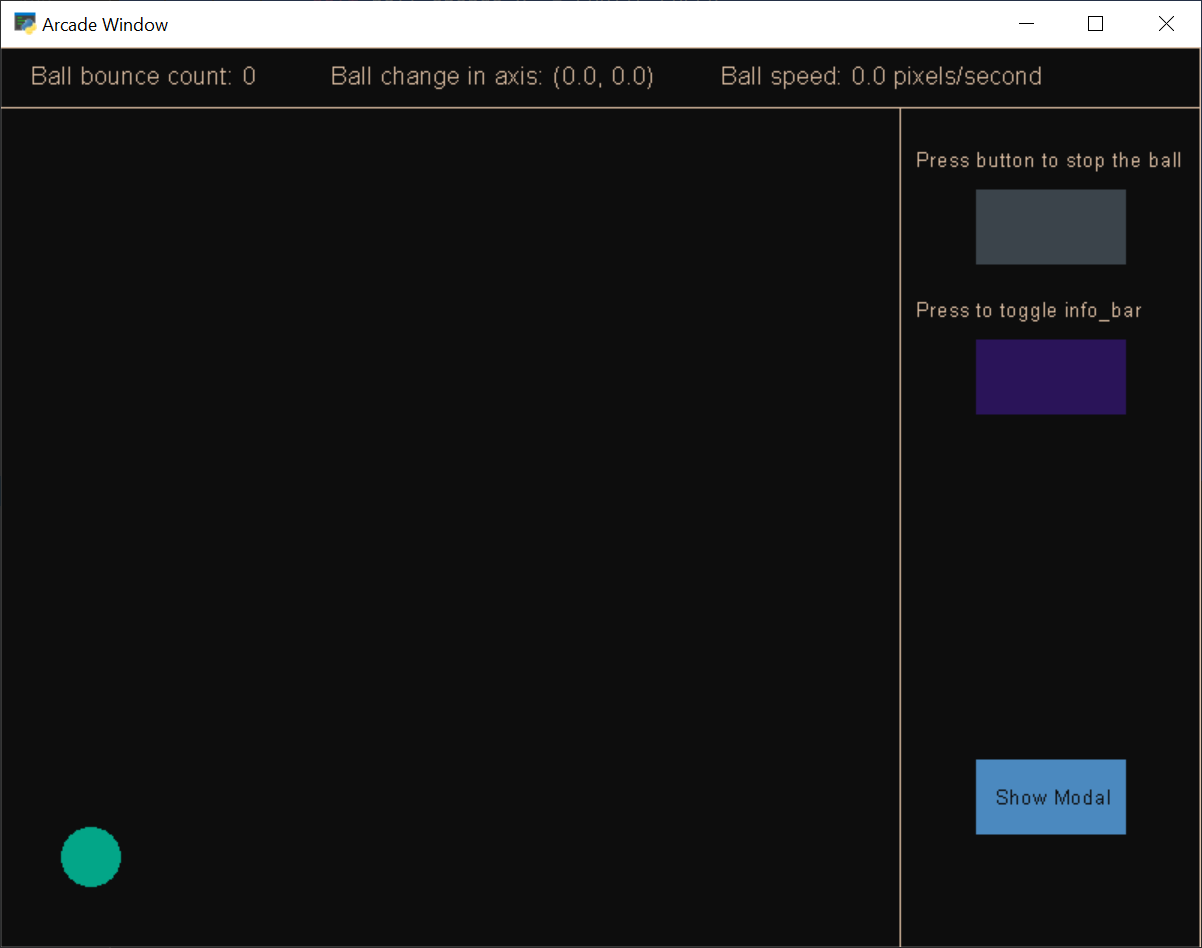
sections_demo_3.py#
1 2 3 4 5 6 7 8 9 10 11 12 13 14 15 16 17 18 19 20 21 22 23 24 25 26 27 28 29 30 31 32 33 34 35 36 37 38 39 40 41 42 43 44 45 46 47 48 49 50 51 52 53 54 55 56 57 58 59 60 61 62 63 64 65 66 67 68 69 70 71 72 73 74 75 76 77 78 79 80 81 82 83 84 85 86 87 88 89 90 91 92 93 94 95 96 97 98 99 100 101 102 103 104 105 106 107 108 109 110 111 112 113 114 115 116 117 118 119 120 121 122 123 124 125 126 127 128 129 130 131 132 133 134 135 136 137 138 139 140 141 142 143 144 145 146 147 148 149 150 151 152 153 154 155 156 157 158 159 160 161 162 163 164 165 166 167 168 169 170 171 172 173 174 175 176 177 178 179 180 181 182 183 184 185 186 187 188 189 190 191 192 193 194 195 196 197 198 199 200 201 202 203 204 205 206 207 208 209 210 211 212 213 214 215 216 217 218 219 220 221 222 223 224 225 226 227 228 229 230 231 232 233 234 235 236 237 238 239 240 241 242 243 244 245 246 247 248 249 250 251 252 253 254 255 256 257 258 259 260 261 262 263 264 265 266 267 268 269 270 271 272 273 274 275 276 277 278 279 280 281 282 283 284 285 286 287 288 289 290 291 292 293 294 295 296 | """ Section Example 3: This shows how sections work with a very small example What's key here is to understand how sections can isolate code that otherwise goes packed together in the view. Also, note that events are received on each section only based on the section configuration. This way you don't have to check every time if the mouse position is on top of some area. Note: - Event dispatching (two sections will receive on_key_press and on_key_release) - Prevent dispatching to allow some events to stop propagating - Event draw, update and event delivering order based on section_manager sections list order - Section "enable" property to show or hide sections - Modal Sections: sections that draw last but capture all events and also stop other sections from updating. """ from typing import Optional from math import sqrt import arcade from arcade import Section INFO_BAR_HEIGHT = 40 PANEL_WIDTH = 200 SPRITE_SPEED = 1 COLOR_LIGHT = arcade.color_from_hex_string('#D9BBA0') COLOR_DARK = arcade.color_from_hex_string('#0D0D0D') COLOR_1 = arcade.color_from_hex_string('#2A1459') COLOR_2 = arcade.color_from_hex_string('#4B89BF') COLOR_3 = arcade.color_from_hex_string('#03A688') class Ball(arcade.SpriteCircle): """ The moving ball """ def __init__(self, radius, color): super().__init__(radius, color) self.bounce_count: int = 0 # to count the number of bounces @property def speed(self): # return euclidian distance * current fps (60 default) return int(sqrt(pow(self.change_x, 2) + pow(self.change_y, 2)) * 60) class ModalSection(Section): """ A modal section that represents a popup that waits for user input """ def __init__(self, left: int, bottom: int, width: int, height: int): super().__init__(left, bottom, width, height, modal=True, enabled=False) # modal button self.button = arcade.SpriteSolidColor(100, 50, arcade.color.RED) pos = self.left + self.width / 2, self.bottom + self.height / 2 self.button.position = pos def on_draw(self): # draw modal frame and button arcade.draw_lrtb_rectangle_filled(self.left, self.right, self.top, self.bottom, arcade.color.GRAY) arcade.draw_lrtb_rectangle_outline(self.left, self.right, self.top, self.bottom, arcade.color.WHITE) self.draw_button() def draw_button(self): # draws the button and button text self.button.draw() arcade.draw_text('Close Modal', self.button.left + 5, self.button.bottom + self.button.height / 2, arcade.color.WHITE) def on_resize(self, width: int, height: int): """ set position on screen resize """ self.left = width // 3 self.bottom = (height // 2) - self.height // 2 pos = self.left + self.width / 2, self.bottom + self.height / 2 self.button.position = pos def on_mouse_press(self, x: float, y: float, button: int, modifiers: int): """ Check if the button is pressed """ if self.button.collides_with_point((x, y)): self.enabled = False class InfoBar(Section): """ This is the top bar of the screen where info is showed """ @property def ball(self): return self.view.map.ball def on_draw(self): # draw game info arcade.draw_lrtb_rectangle_filled(self.left, self.right, self.top, self.bottom, COLOR_DARK) arcade.draw_lrtb_rectangle_outline(self.left, self.right, self.top, self.bottom, COLOR_LIGHT) arcade.draw_text(f'Ball bounce count: {self.ball.bounce_count}', self.left + 20, self.top - self.height / 1.6, COLOR_LIGHT) ball_change_axis = self.ball.change_x, self.ball.change_y arcade.draw_text(f'Ball change in axis: {ball_change_axis}', self.left + 220, self.top - self.height / 1.6, COLOR_LIGHT) arcade.draw_text(f'Ball speed: {self.ball.speed} pixels/second', self.left + 480, self.top - self.height / 1.6, COLOR_LIGHT) def on_resize(self, width: int, height: int): # stick to the top self.width = width self.bottom = height - self.view.info_bar.height class Panel(Section): """This is the Panel to the right where buttons and info is showed """ def __init__(self, left: int, bottom: int, width: int, height: int, **kwargs): super().__init__(left, bottom, width, height, **kwargs) # create buttons self.button_stop = self.new_button(arcade.color.ARSENIC) self.button_toggle_info_bar = self.new_button(COLOR_1) self.button_show_modal = self.new_button(COLOR_2) # to show the key that's actually pressed self.pressed_key: Optional[int] = None @staticmethod def new_button(color): # helper to create new buttons return arcade.SpriteSolidColor(100, 50, color) def draw_button_stop(self): arcade.draw_text('Press button to stop the ball', self.left + 10, self.top - 40, COLOR_LIGHT, 10) self.button_stop.draw() def draw_button_toggle_info_bar(self): arcade.draw_text('Press to toggle info_bar', self.left + 10, self.top - 140, COLOR_LIGHT, 10) self.button_toggle_info_bar.draw() def draw_button_show_modal(self): self.button_show_modal.draw() arcade.draw_text('Show Modal', self.left - 37 + self.width / 2, self.bottom + 95, COLOR_DARK, 10) def on_draw(self): arcade.draw_lrtb_rectangle_filled(self.left, self.right, self.top, self.bottom, COLOR_DARK) arcade.draw_lrtb_rectangle_outline(self.left, self.right, self.top, self.bottom, COLOR_LIGHT) self.draw_button_stop() self.draw_button_toggle_info_bar() if self.pressed_key: arcade.draw_text(f'Pressed key code: {self.pressed_key}', self.left + 10, self.top - 240, COLOR_LIGHT, 9) self.draw_button_show_modal() def on_mouse_press(self, x: float, y: float, button: int, modifiers: int): if self.button_stop.collides_with_point((x, y)): self.view.map.ball.stop() elif self.button_toggle_info_bar.collides_with_point((x, y)): self.view.info_bar.enabled = not self.view.info_bar.enabled elif self.button_show_modal.collides_with_point((x, y)): self.view.modal_section.enabled = True def on_resize(self, width: int, height: int): # stick to the right self.left = width - self.width self.height = height - self.view.info_bar.height self.button_stop.position = self.left + self.width / 2, self.top - 80 pos = self.left + self.width / 2, self.top - 180 self.button_toggle_info_bar.position = pos pos = self.left + self.width / 2, self.bottom + 100 self.button_show_modal.position = pos def on_key_press(self, symbol: int, modifiers: int): self.pressed_key = symbol def on_key_release(self, _symbol: int, _modifiers: int): self.pressed_key = None class Map(Section): """ This represents the place where the game takes place """ def __init__(self, left: int, bottom: int, width: int, height: int, **kwargs): super().__init__(left, bottom, width, height, **kwargs) self.ball = Ball(20, COLOR_3) self.ball.position = 60, 60 self.sprite_list = arcade.SpriteList() self.sprite_list.append(self.ball) self.pressed_key: Optional[int] = None def on_update(self, delta_time: float): if self.pressed_key: if self.pressed_key == arcade.key.UP: self.ball.change_y += SPRITE_SPEED elif self.pressed_key == arcade.key.RIGHT: self.ball.change_x += SPRITE_SPEED elif self.pressed_key == arcade.key.DOWN: self.ball.change_y -= SPRITE_SPEED elif self.pressed_key == arcade.key.LEFT: self.ball.change_x -= SPRITE_SPEED self.sprite_list.update() if self.ball.top >= self.top or self.ball.bottom <= self.bottom: self.ball.change_y *= -1 self.ball.bounce_count += 1 if self.ball.left <= self.left or self.ball.right >= self.right: self.ball.change_x *= -1 self.ball.bounce_count += 1 def on_draw(self): arcade.draw_lrtb_rectangle_filled(self.left, self.right, self.top, self.bottom, COLOR_DARK) arcade.draw_lrtb_rectangle_outline(self.left, self.right, self.top, self.bottom, COLOR_LIGHT) self.sprite_list.draw() def on_key_press(self, symbol: int, modifiers: int): self.pressed_key = symbol def on_key_release(self, _symbol: int, _modifiers: int): self.pressed_key = None def on_resize(self, width: int, height: int): self.width = width - self.view.panel.width self.height = height - self.view.info_bar.height class GameView(arcade.View): """ The game itself """ def __init__(self): super().__init__() # create and store the modal, so we can set # self.modal_section.enabled = True to show it self.modal_section = ModalSection(self.window.width / 3, (self.window.height / 2) - 100, 400, 200) # we set accept_keyboard_events to False (default to True) self.info_bar = InfoBar(0, self.window.height - INFO_BAR_HEIGHT, self.window.width, INFO_BAR_HEIGHT, accept_keyboard_events=False) # as prevent_dispatch is on by default, we let pass the events to the # following Section: the map self.panel = Panel(self.window.width - PANEL_WIDTH, 0, PANEL_WIDTH, self.window.height - INFO_BAR_HEIGHT, prevent_dispatch={False}) self.map = Map(0, 0, self.window.width - PANEL_WIDTH, self.window.height - INFO_BAR_HEIGHT) # add the sections self.section_manager.add_section(self.modal_section) self.section_manager.add_section(self.info_bar) self.section_manager.add_section(self.panel) self.section_manager.add_section(self.map) def on_draw(self): arcade.start_render() def main(): window = arcade.Window(resizable=True) game = GameView() window.show_view(game) window.run() if __name__ == '__main__': main() |