透视#
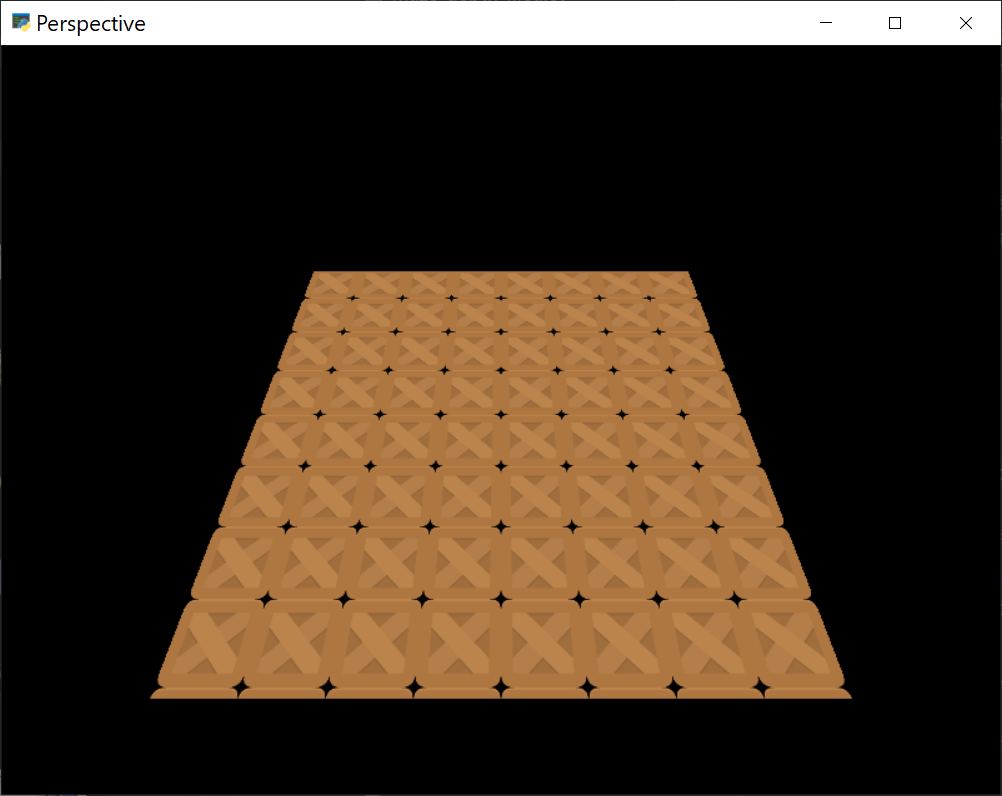
perspective.py#
1 2 3 4 5 6 7 8 9 10 11 12 13 14 15 16 17 18 19 20 21 22 23 24 25 26 27 28 29 30 31 32 33 34 35 36 37 38 39 40 41 42 43 44 45 46 47 48 49 50 51 52 53 54 55 56 57 58 59 60 61 62 63 64 65 66 67 68 69 70 71 72 73 74 75 76 77 78 79 80 81 82 83 84 85 86 87 88 89 90 91 92 93 94 95 96 97 98 99 100 101 102 103 104 105 106 107 108 109 110 111 112 113 114 115 116 117 118 119 120 121 122 123 124 125 126 127 128 129 130 131 132 133 134 135 136 137 138 139 140 141 142 | # flake8: noqa """ Perspective example using the lower level rendering API. This is definitely in the advanced section, but it can be a useful tool to learn. Sometimes we want perspective projection for things like backgrounds. This can be done very efficiently with shaders. In this example we render content into a framebuffer / virtual screen and map that on a texture we can rotate in 3D. """ from array import array import arcade from pyglet.math import Mat4 from arcade.gl import BufferDescription class Perspective(arcade.Window): def __init__(self): super().__init__(800, 600, "Perspective", resizable=True) # Simple texture shader for the plane. # It support projection and model matrix # and a scroll value for texture coordinates self.program = self.ctx.program( vertex_shader=""" #version 330 uniform mat4 projection; uniform mat4 model; in vec3 in_pos; in vec2 in_uv; out vec2 uv; void main() { gl_Position = projection * model * vec4(in_pos, 1.0); uv = in_uv; } """, fragment_shader=""" #version 330 uniform sampler2D layer; uniform vec2 scroll; in vec2 uv; out vec4 fragColor; void main() { fragColor = texture(layer, uv + scroll); } """, ) # # Matrix for perspective projection self.proj = Mat4.perspective_projection(0, self.width, 0, self.height, 0.1, 100, fov=75) # # Configure the projection in the shader self.program["projection"] = self.proj # Framebuffer / virtual screen to render the contents into self.fbo = self.ctx.framebuffer( color_attachments=self.ctx.texture(size=(1024, 1024)) ) # Set up the geometry buffer for the plane. # This is four points with texture coordinates # creating a rectangle buffer = self.ctx.buffer( data=array( 'f', [ # x y z u v -1, 1, 0, 0, 1, # Top Left -1, -1, 0, 0, 0, # Bottom Left 1, 1, 0, 1, 1, # Top Right 1, -1, 0, 1, 0, # Bottom right ] ) ) # Make this into a geometry object we can draw- # Here we describe the contents of the buffer so the shader can understand it self.geometry = self.ctx.geometry( content=[BufferDescription(buffer, "3f 2f", ("in_pos", "in_uv"))], mode=self.ctx.TRIANGLE_STRIP, ) # Create some sprites self.spritelist = arcade.SpriteList() for y in range(8): for x in range(8): self.spritelist.append( arcade.Sprite( ":resources:images/tiles/boxCrate_double.png", center_x=64 + x * 128, center_y=64 + y * 128, ) ) self.time = 0 def on_draw(self): # Every frame we can update the offscreen texture if needed self.draw_offscreen() # Clear the window self.clear() # Bind the texture containing the offscreen data to channel 0 self.fbo.color_attachments[0].use(unit=0) # Move the plane into camera view and rotate it translate = Mat4.from_translation((0, 0, -2)) rotate = Mat4.from_rotation(self.time / 2, (1, 0, 0)) self.program["model"] = rotate @ translate # Scroll the texture coordinates self.program["scroll"] = 0, -self.time / 5 # Draw the plane self.geometry.render(self.program) def on_update(self, delta_time: float): self.time += delta_time def draw_offscreen(self): """Render into the texture mapped """ # Activate the offscreen framebuffer and draw the sprites into it with self.fbo.activate() as fbo: fbo.clear() arcade.set_viewport(0, self.fbo.width, 0, self.fbo.height) self.spritelist.draw() def on_resize(self, width: float, height: float): super().on_resize(width, height) self.program["projection"] = Mat4.perspective_projection(0, self.width, 0, self.height, 0.1, 100, fov=75) Perspective().run() |