放松示例1#
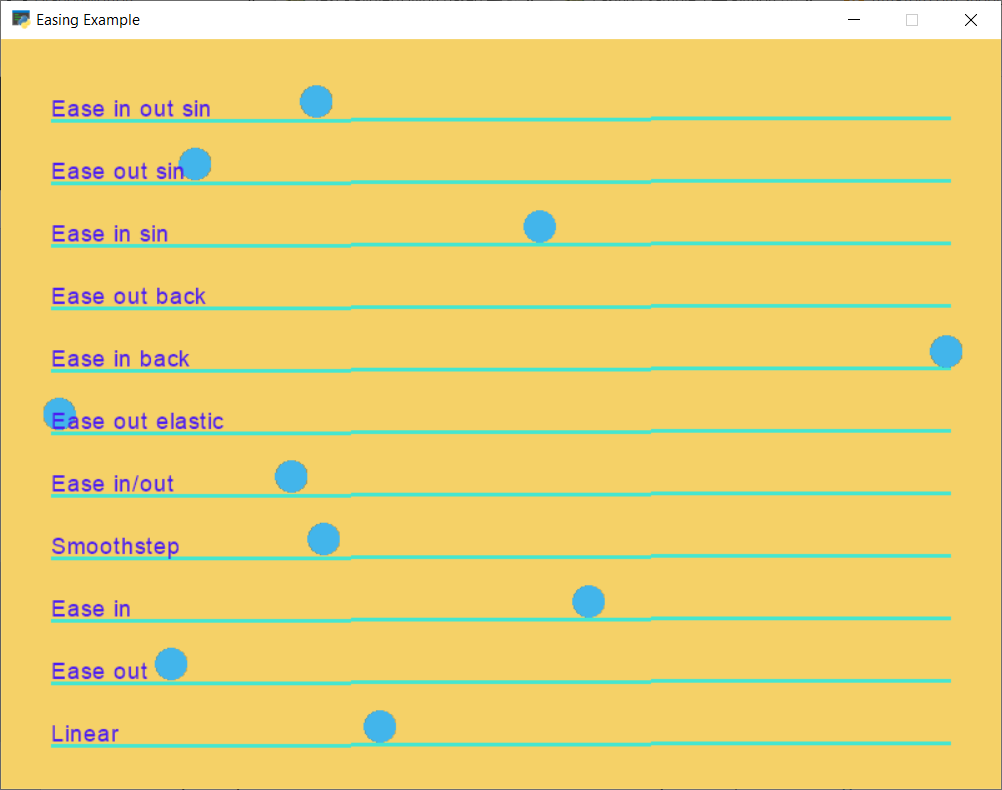
来源#
easing_example.py#
1 2 3 4 5 6 7 8 9 10 11 12 13 14 15 16 17 18 19 20 21 22 23 24 25 26 27 28 29 30 31 32 33 34 35 36 37 38 39 40 41 42 43 44 45 46 47 48 49 50 51 52 53 54 55 56 57 58 59 60 61 62 63 64 65 66 67 68 69 70 71 72 73 74 75 76 77 78 79 80 81 82 83 84 85 86 87 88 89 90 91 92 93 94 95 96 97 98 99 100 101 102 103 104 105 106 107 108 109 110 111 112 113 114 115 116 117 118 119 120 121 122 123 124 125 126 127 128 129 130 131 132 133 134 135 136 137 138 139 140 141 142 143 144 145 146 147 148 149 150 151 152 153 154 155 156 157 158 159 160 161 162 163 164 165 166 167 168 169 170 171 172 173 174 175 176 177 178 179 180 181 182 183 | """ Example showing how to use the easing functions for position. See: https://easings.net/ ...for a great guide on the theory behind how easings can work. See example 2 for how to use easings for angles. If Python and Arcade are installed, this example can be run from the command line with: python -m arcade.examples.easing_example_1 """ import arcade SPRITE_SCALING = 0.5 SCREEN_WIDTH = 800 SCREEN_HEIGHT = 600 SCREEN_TITLE = "Easing Example" BACKGROUND_COLOR = "#F5D167" TEXT_COLOR = "#4B1DF2" BALL_COLOR = "#42B5EB" LINE_COLOR = "#45E6D0" LINE_WIDTH = 3 X_START = 40 X_END = 760 Y_INTERVAL = 50 BALL_RADIUS = 13 TIME = 3.0 class EasingCircle(arcade.SpriteCircle): """ Player class """ def __init__(self, radius, color): """ Set up the player """ # Call the parent init super().__init__(radius, color) self.easing_x_data = None self.easing_y_data = None def on_update(self, delta_time: float = 1 / 60): if self.easing_x_data is not None: done, self.center_x = arcade.ease_update(self.easing_x_data, delta_time) if done: x = X_START if self.center_x < SCREEN_WIDTH / 2: x = X_END ex, ey = arcade.ease_position(self.position, (x, self.center_y), rate=180, ease_function=self.easing_x_data.ease_function) self.easing_x_data = ex if self.easing_y_data is not None: done, self.center_y = arcade.ease_update(self.easing_y_data, delta_time) if done: self.easing_y_data = None class MyGame(arcade.Window): """ Main application class. """ def __init__(self, width, height, title): """ Initializer """ # Call the parent class initializer super().__init__(width, height, title) # Set the background color self.background_color = arcade.color_from_hex_string(BACKGROUND_COLOR) self.ball_list = None self.text_list = [] self.lines = None def setup(self): """ Set up the game and initialize the variables. """ # Sprite lists self.ball_list = arcade.SpriteList() self.lines = arcade.ShapeElementList() def create_ball(ball_y, ease_function): ball = EasingCircle(BALL_RADIUS, arcade.color_from_hex_string(BALL_COLOR)) ball.position = X_START, ball_y p1 = ball.position p2 = (X_END, ball_y) ex, ey = arcade.ease_position(p1, p2, time=TIME, ease_function=ease_function) ball.ease_function = ease_function ball.easing_x_data = ex ball.easing_y_data = ey return ball def create_line(line_y): line = arcade.create_line(X_START, line_y - BALL_RADIUS - LINE_WIDTH, X_END, line_y - BALL_RADIUS, line_color, line_width=LINE_WIDTH) return line def create_text(text_string): text = arcade.Text(text_string, X_START, y - BALL_RADIUS, color=text_color, font_size=14) return text def add_item(item_y, ease_function, text): ball = create_ball(item_y, ease_function) self.ball_list.append(ball) text = create_text(text) self.text_list.append(text) line = create_line(item_y) self.lines.append(line) text_color = arcade.color_from_hex_string(TEXT_COLOR) line_color = arcade.color_from_hex_string(LINE_COLOR) y = Y_INTERVAL add_item(y, arcade.linear, "Linear") y += Y_INTERVAL add_item(y, arcade.ease_out, "Ease out") y += Y_INTERVAL add_item(y, arcade.ease_in, "Ease in") y += Y_INTERVAL add_item(y, arcade.smoothstep, "Smoothstep") y += Y_INTERVAL add_item(y, arcade.ease_in_out, "Ease in/out") y += Y_INTERVAL add_item(y, arcade.ease_out_elastic, "Ease out elastic") y += Y_INTERVAL add_item(y, arcade.ease_in_back, "Ease in back") y += Y_INTERVAL add_item(y, arcade.ease_out_back, "Ease out back") y += Y_INTERVAL add_item(y, arcade.ease_in_sin, "Ease in sin") y += Y_INTERVAL add_item(y, arcade.ease_out_sin, "Ease out sin") y += Y_INTERVAL add_item(y, arcade.ease_in_out_sin, "Ease in out sin") def on_draw(self): """ Render the screen. """ # This command has to happen before we start drawing self.clear() self.lines.draw() # Draw all the sprites. self.ball_list.draw() for text in self.text_list: text.draw() def on_update(self, delta_time): """ Movement and game logic """ # Call update on all sprites (The sprites don't do much in this # example though.) self.ball_list.on_update(delta_time) def main(): """ Main function """ window = MyGame(SCREEN_WIDTH, SCREEN_HEIGHT, SCREEN_TITLE) window.setup() arcade.run() if __name__ == "__main__": main() |