
从代码自动生成文档
在 previous section 在本教程中,您手动记录了Sphinx中的一个Python函数。然而,描述与代码本身不同步,因为函数签名不同。再说了,如果能重复利用 Python docstrings 而不必将信息写在两个地方。
幸运的是, the autodoc extension 提供此功能。
在AutoDoc中重复使用签名和文档字符串
要使用AutoDoc,请首先将其添加到启用的扩展列表中:
extensions = [
    'sphinx.ext.duration',
    'sphinx.ext.doctest',
    'sphinx.ext.autodoc',
]
下一步,将 .. py:function 指令指向原始Python文件中的函数docstring,如下所示:
def get_random_ingredients(kind=None):
    """
    Return a list of random ingredients as strings.

    :param kind: Optional "kind" of ingredients.
    :type kind: list[str] or None
    :raise lumache.InvalidKindError: If the kind is invalid.
    :return: The ingredients list.
    :rtype: list[str]

    """
    return ["shells", "gorgonzola", "parsley"]
最后,将 .. py:function 来自Sphinx文档的指令 autofunction :
you can use the ``lumache.get_random_ingredients()`` function:

.. autofunction:: lumache.get_random_ingredients
如果您现在构建HTML文档,则输出将是相同的!优点是它是从代码本身生成的。Sphinx从文档字符串中获取并将其包含在内,还生成了适当的交叉引用。
您还可以从其他对象自动生成文档。例如,将 InvalidKindError 例外情况:
class InvalidKindError(Exception):
    """Raised if the kind is invalid."""
    pass
并替换 .. py:exception 使用的指令 autoexception 详情如下:
or ``"veggies"``. Otherwise, :py:func:`lumache.get_random_ingredients`
will raise an exception.

.. autoexception:: lumache.InvalidKindError
再一次,在跑步之后 make html ,则输出将与以前相同。
生成全面的API参考
在使用时 sphinx.ext.autodoc 使代码和文档保持同步变得容易得多,但它仍然需要您编写 auto* 指令为您要记录的每个对象指定。Sphinx提供了另一个级别的自动化: autosummary 分机。
这个 autosummary 指令生成的文档包含所有必需的 autodoc 指令。要使用它,请首先启用自动汇总扩展:
extensions = [
   'sphinx.ext.duration',
   'sphinx.ext.doctest',
   'sphinx.ext.autodoc',
   'sphinx.ext.autosummary',
]
接下来,创建一个新的 api.rst 包含以下内容的文件:
API
===

.. autosummary::
   :toctree: generated

   lumache
请记住将新文档包括在根目录树中:
Contents
--------

.. toctree::

   usage
   api
最后,在构建完运行 make html ,它将包含两个新页面:
api.html,对应于docs/source/api.rst并包含一个表,其中包含您在autosummary指令(在本例中,只有一个)。generated/lumache.html,对应于新创建的reStructuredtext文件generated/lumache.rst并包含模块成员的摘要,在本例中是一个函数和一个异常。
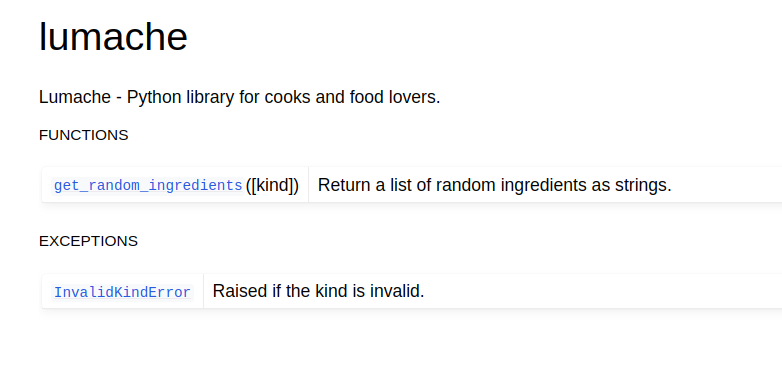
自动摘要创建的摘要页面
摘要页面中的每个链接都会将您带到您最初使用相应 autodoc 指令,在本例中为 usage.rst 文件。
备注
生成的文件基于 Jinja2 templates 的 can be customized ,但这超出了本教程的范围。