资源嵌入
PostgREST允许在单个API调用中包含相关资源。这减少了对许多API请求的需要。
外键联接
服务器使用 Foreign Keys 以确定哪些数据库对象可以联接在一起。它支持连接表、视图和表值函数。
对于表,它使用外键列(考虑组合键)生成连接条件。
对于视图,它使用视图的基表外键列生成联接条件。
对于表值函数,它基于返回的表类型的外键列生成联接条件。
重要
无论何时更改外键,都必须执行以下操作 架构缓存重新加载 以使此功能正常工作。
两性关系
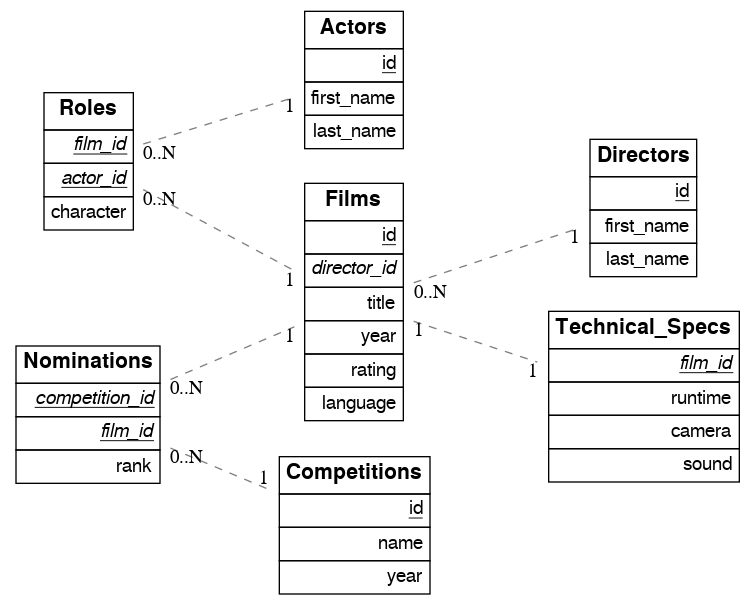
例如,考虑一个关于电影及其奖项的数据库:
create table actors(
  id int primary key generated always as identity,
  first_name text,
  last_name text
);

create table directors(
  id int primary key generated always as identity,
  first_name text,
  last_name text
);

create table films(
  id int primary key generated always as identity,
  director_id int references directors(id),
  title text,
  year int,
  rating numeric(3,1),
  language text
);

create table technical_specs(
  film_id int references films(id) primary key,
  runtime time,
  camera text,
  sound text
);

create table roles(
  film_id int references films(id),
  actor_id int references actors(id),
  character text,
  primary key(film_id, actor_id)
);

create table competitions(
  id int primary key generated always as identity,
  name text,
  year int
);

create table nominations(
  competition_id int references competitions(id),
  film_id int references films(id),
  rank int,
  primary key (competition_id, film_id)
);
多对一关系
自.以来 films 有一个 foreign key 至 directors ,这建立了一种多对一的关系。这使我们能够请求所有电影和每部电影的导演。
curl "http://localhost:3000/films?select=title,directors(id,last_name)"
[
  { "title": "Workers Leaving The Lumière Factory In Lyon",
    "directors": {
      "id": 2,
      "last_name": "Lumière"
    }
  },
  { "title": "The Dickson Experimental Sound Film",
    "directors": {
      "id": 1,
      "last_name": "Dickson"
    }
  },
  { "title": "The Haunted Castle",
    "directors": {
      "id": 3,
      "last_name": "Méliès"
    }
  }
]
请注意,嵌入的 directors 被作为JSON对象返回,因为“to-one”结束。
由于表名是复数,我们可以更准确地将其设置为带有别名的单数。
curl "http://localhost:3000/films?select=title,director:directors(id,last_name)"
[
  { "title": "Workers Leaving The Lumière Factory In Lyon",
    "director": {
      "id": 2,
      "last_name": "Lumière"
    }
  },
  ".."
]
一对多关系
这个 foreign key reference 建立反向一对多关系。在这种情况下, films 由于“对多”结尾,因此返回为JSON数组。
curl "http://localhost:3000/directors?select=last_name,films(title)"
[
  { "last_name": "Lumière",
    "films": [
      {"title": "Workers Leaving The Lumière Factory In Lyon"}
    ]
  },
  { "last_name": "Dickson",
    "films": [
      {"title": "The Dickson Experimental Sound Film"}
    ]
  },
  { "last_name": "Méliès",
    "films": [
      {"title": "The Haunted Castle"}
    ]
  }
]
多对多关系
联结表确定多对多关系。它必须包含指向其他两个表的外键,并且它们必须是其组合键的一部分。在 sample film database , roles 被用作连接表。
如果复合键具有附加列,则还会检测连接表。
create table roles(
  id int generated always as identity,
, film_id int references films(id)
, actor_id int references actors(id)
, character text,
, primary key(id, film_id, actor_id)
);
curl "http://localhost:3000/actors?select=first_name,last_name,films(title)"
[
  { "first_name": "Willem",
    "last_name": "Dafoe",
    "films": [
      {"title": "The Lighthouse"}
    ]
  },
  ".."
]
一对一关系
一对一关系可以通过两种方式检测。(We会用 films 和 technical_specs 表从 sample film database 作为示例)。
当外键也是主键时。
create table technical_specs(
  film_id int references films(id) primary key
-- ...
);
或者当外键具有唯一约束时。
create table technical_specs(
  id int primary key
, film_id int references films(id) unique
-- ...
);
curl "http://localhost:3000/films?select=title,technical_specs(camera)"
[
  {
    "title": "Pulp Fiction",
    "technical_specs": {"camera": "Arriflex 35-III"}
  },
  ".."
]
计算出的关系
您可以使用函数手动定义关系。这对于不能定义外键的数据库对象非常有用,例如 Foreign Data Wrappers 。
假设有一张外国餐桌 premieres 我们想要与之相关的 films 。
create foreign table premieres (
  id integer,
  location text,
  "date" date,
  film_id integer
) server import_csv options ( filename '/tmp/directors.csv', format 'csv');

create function film(premieres) returns setof films rows 1 as $$
  select * from films where id = $1.film_id
$$ stable language sql;
上面的函数定义了 premieres (参数)和 films (返回类型)。因为有一个 rows 1 ,这定义了一种多对一关系。函数的名称 film 是任意的,可以用来进行嵌入:
curl "http://localhost:3000/premieres?select=location,film(name)"
[
  {
    "location": "Cannes Film Festival",
    "film": {"name": "Pulp Fiction"}
  },
  ".."
]
现在,让我们定义相反的一对多关系。
create function premieres(films) returns setof premieres as $$
  select * from premieres where film_id = $1.id
$$ stable language sql;
在这种情况下,有一个隐含的 ROWS 1000 由PostgreSQL定义 (search "result_rows" on this PostgreSQL doc )。我们认为任何大于1的值都是“多”的,因此这定义了一对多关系。
curl "http://localhost:3000/films?select=name,premieres(name)"
[
  {
    "name": "Pulp Ficiton",
    "premieres": [{"location": "Cannes Festival"}]
  },
  ".."
]
压倒一切的关系
计算关系还允许您覆盖PostgREST自动检测的关系。
例如,要重写 many-to-one relationship 之间 films 和 directors 。
create function directors(films) returns setof directors rows 1 as $$
  select * from directors where id = $1.director_id
$$ stable language sql;
多亏了重载函数,您可以为不同的参数使用相同的函数名。从而定义从其他表/视图到主管的关系。
create function directors(film_schools) returns setof directors as $$
  select * from directors where film_school_id = $1.id
$$ stable language sql;
计算关系具有良好的性能,因为它们的预期设计支持 function inlining 。
警告
始终使用
SETOF在创建计算关系时。函数可以返回表,而无需使用SETOF,但请记住,PostgreSQL不会内联它们。确保正确地标记
to-one关系的一部分。在使用ROWS 1Estimate,PostgREST预计将返回单行。如果不是这样,它将取消嵌套嵌入并返回顶级资源的重复值。
多个外键关系上的外键联接
当表之间有多个外键时, 外键联接 需要消除歧义以解决连接使用哪些外键列的问题。为此,您可以通过使用 !<fk> 语法。
多对一多对一
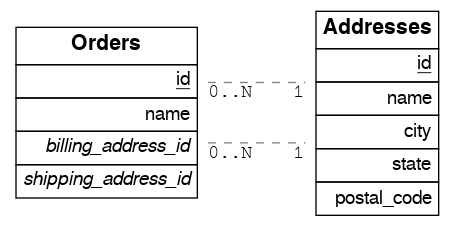
例如,假设您具有以下内容 orders 和 addresses 表:
create table addresses (
  id int primary key generated always as identity,
  name text,
  city text,
  state text,
  postal_code char(5)
);

create table orders (
  id int primary key generated always as identity,
  name text,
  billing_address_id int,
  shipping_address_id int,
  constraint billing  foreign key(billing_address_id) references addresses(id),
  constraint shipping foreign key(shipping_address_id) references addresses(id)
);
自.以来 orders 表有两个指向 addresses 表中,外键联接不明确,并且PostgREST将响应错误:
curl "http://localhost:3000/orders?select=*,addresses(*)" -i
HTTP/1.1 300 Multiple Choices
{
  "code": "PGRST201",
  "details": [
    {
      "cardinality": "many-to-one",
      "embedding": "orders with addresses",
      "relationship": "billing using orders(billing_address_id) and addresses(id)"
    },
    {
      "cardinality": "many-to-one",
      "embedding": "orders with addresses",
      "relationship": "shipping using orders(shipping_address_id) and addresses(id)"
    }
  ],
  "hint": "Try changing 'addresses' to one of the following: 'addresses!billing', 'addresses!shipping'. Find the desired relationship in the 'details' key.",
  "message": "Could not embed because more than one relationship was found for 'orders' and 'addresses'"
}
要成功加入 orders 使用 addresses ,我们可以跟随错误 hint 它告诉我们将外键名称添加为 !billing 或 !shipping 。请注意,外键已在 SQL definition above 。为了使结果更清楚,我们还将为表添加别名:
# curl "http://localhost:3000/orders?select=name,billing_address:addresses!billing(name),shipping_address:addresses!shipping(name)"

curl --get "http://localhost:3000/orders" \
  -d "select=name,billing_address:addresses!billing(name),shipping_address:addresses!shipping(name)"
[
  {
    "name": "Personal Water Filter",
    "billing_address": {
      "name": "32 Glenlake Dr.Dearborn, MI 48124"
    },
    "shipping_address": {
      "name": "30 Glenlake Dr.Dearborn, MI 48124"
    }
  }
]
多对多
让我们把桌子从 多对一多对一 。要获得相反的一对多关系,我们还可以指定外键名称:
# curl "http://localhost:3000/addresses?select=name,billing_orders:orders!billing(name),shipping_orders!shipping(name)&id=eq.1"

curl --get "http://localhost:3000/addresses" \
  -d "select=name,billing_orders:orders!billing(name),shipping_orders!shipping(name)" \
  -d "id=eq.1"
[
  {
    "name": "32 Glenlake Dr.Dearborn, MI 48124",
    "billing_orders": [
      { "name": "Personal Water Filter" },
      { "name": "Coffee Machine" }
    ],
    "shipping_orders": [
      { "name": "Coffee Machine" }
    ]
  }
]
递归关系
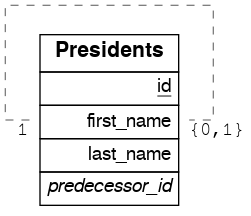
要消除递归关系的歧义,PostgREST需要 计算出的关系 。
递归一对一
create table presidents (
  id int primary key generated always as identity,
  first_name text,
  last_name text,
  predecessor_id int references presidents(id) unique
);
要获得递归一对一关系的任何一方,请创建以下函数:
create or replace function predecessor(presidents) returns setof presidents rows 1 as $$
  select * from presidents where id = $1.predecessor_id
$$ stable language sql;

create or replace function successor(presidents) returns setof presidents rows 1 as $$
  select * from presidents where predecessor_id = $1.id
$$ stable language sql;
现在,要质疑一位总统及其前任和继任者:
# curl "http://localhost:3000/presidents?select=last_name,predecessor(last_name),successor(last_name)&id=eq.2"

curl --get "http://localhost:3000/presidents" \
  -d "select=last_name,predecessor(last_name),successor(last_name)" \
  -d "id=eq.2"
[
  {
    "last_name": "Adams",
    "predecessor": {
      "last_name": "Washington"
    },
    "successor": {
      "last_name": "Jefferson"
    }
  }
]
递归的一对多
create table employees (
  id int primary key generated always as identity,
  first_name text,
  last_name text,
  supervisor_id int references employees(id)
);
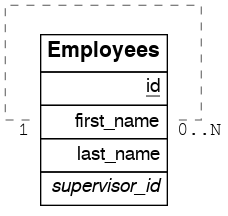
要实现一对多嵌入,即主管及其被主管,请创建如下函数:
create or replace function supervisees(employees) returns setof employees as $$
  select * from employees where supervisor_id = $1.id
$$ stable language sql;
现在,查询将是:
# curl "http://localhost:3000/employees?select=last_name,supervisees(last_name)&id=eq.1"

curl --get "http://localhost:3000/employees" \
  -d "select=last_name,supervisees(last_name)" \
  -d "id=eq.1"
[
  {
    "name": "Taylor",
    "supervisees": [
      { "name": "Johnson" },
      { "name": "Miller" }
    ]
  }
]
递归多对一
我们拿一样的吧。 employees 表格来自 递归的一对多 。要获得多对一关系,即员工与其各自的主管之间的关系,您需要创建如下函数:
create or replace function supervisor(employees) returns setof employees rows 1 as $$
  select * from employees where id = $1.supervisor_id
$$ stable language sql;
然后,查询将是:
# curl "http://localhost:3000/employees?select=last_name,supervisor(last_name)&id=eq.3"

curl --get "http://localhost:3000/employees" \
  -d "select=last_name,supervisor(last_name)" \
  -d "id=eq.3"
[
  {
    "last_name": "Miller",
    "supervisor": {
      "last_name": "Taylor"
    }
  }
]
递归多对多
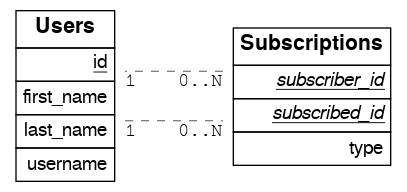
create table users (
  id int primary key generated always as identity,
  first_name text,
  last_name text,
  username text unique
);

create table subscriptions (
  subscriber_id int references users(id),
  subscribed_id int references users(id),
  type text,
  primary key (subscriber_id, subscribed_id)
);
要获取用户的所有订阅者以及他们关注的订阅者,请定义以下函数:
create or replace function subscribers(users) returns setof users as $$
  select u.*
  from users u,
       subscriptions s
  where s.subscriber_id = u.id and
        s.subscribed_id = $1.id
$$ stable language sql;

create or replace function following(users) returns setof users as $$
  select u.*
  from users u,
       subscriptions s
  where s.subscribed_id = u.id and
        s.subscriber_id = $1.id
$$ stable language sql;
然后,请求将是:
# curl "http://localhost:3000/users?select=username,subscribers(username),following(username)&id=eq.4"

curl --get "http://localhost:3000/users" \
  -d "select=username,subscribers(username),following(username)" \
  -d "id=eq.4"
[
  {
    "username": "the_top_artist",
    "subscribers": [
      { "username": "patrick109" },
      { "username": "alicia_smith" }
    ],
    "following": [
      { "username": "top_streamer" }
    ]
  }
]
分区表上的外键连接
外键连接也可以在 partitioned tables 还有其他桌子。
例如,让我们创建 box_office 具有一部电影的每日总收入的分区表:
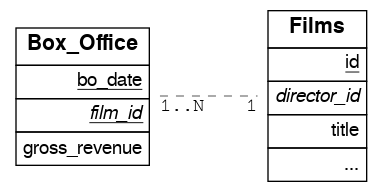
CREATE TABLE box_office (
  bo_date DATE NOT NULL,
  film_id INT REFERENCES films NOT NULL,
  gross_revenue DECIMAL(12,2) NOT NULL,
  PRIMARY KEY (bo_date, film_id)
) PARTITION BY RANGE (bo_date);

-- Let's also create partitions for each month of 2021

CREATE TABLE box_office_2021_01 PARTITION OF box_office
FOR VALUES FROM ('2021-01-01') TO ('2021-01-31');

CREATE TABLE box_office_2021_02 PARTITION OF box_office
FOR VALUES FROM ('2021-02-01') TO ('2021-02-28');

-- and so until december 2021
因为它包含 films_id 外键,可以加入 box_office 和 films :
# curl "http://localhost:3000/box_office?select=bo_date,gross_revenue,films(title)&gross_revenue=gte.1000000"

curl --get "http://localhost:3000/box_office" \
  -d "select=bo_date,gross_revenue,films(title)" \
  -d "gross_revenue=gte.1000000"
备注
不允许在分区上使用外键联接,因为这会导致歧义错误(请参见 多个外键关系上的外键联接 )在它们与其父分区表之间。更多详细信息请访问 #1783(comment) )。 计算出的关系 如果需要,可以使用。
分区表可以引用PostgreSQL 11以后的其他表,但只能从PostgreSQL 12以后的任何其他表引用。
视图上的外键联接
PostgREST将使用其基表推断视图的外键。基表是在 FROM 和 JOIN 视图定义的子句。外键的列必须出现在顶部 SELECT 该视图的子句才能起作用。
例如,以下视图具有 nominations , films 和 competitions 作为基表:
CREATE VIEW nominations_view AS
  SELECT
     films.title as film_title
   , competitions.name as competition_name
   , nominations.rank
   , nominations.film_id as nominations_film_id
   , films.id as film_id
  FROM nominations
  JOIN films ON films.id = nominations.film_id
  JOIN competitions ON competitions.id = nominations.competition_id;
由于此视图包含 nominations.film_id ,它有一个 foreign key 与的关系 films ,然后我们就可以加入 films 桌子。类似地,因为视图包含 films.id ,然后我们也可以加入 roles 以及 actors 表(多对多关系中的最后一个):
# curl "http://localhost:3000/nominations_view?select=film_title,films(language),roles(character),actors(last_name,first_name)&rank=eq.5"

curl --get "http://localhost:3000/nominations_view" \
  -d "select=film_title,films(language),roles(character),actors(last_name,first_name)" \
  -d "rank=eq.5"
也可以使用外键联接 Materialized Views 。
重要
不能保证外键连接在所有类型的视图上都有效。特别是,外键联接在包含联合的视图上不起作用。
为什么?PostgREST通过查询和解析来检测视图中的基表外键 pg_rewrite 。这可能会失败,具体取决于视图的复杂性。
作为一种解决办法,您可以使用 计算出的关系 要定义视图的手动关系,请执行以下操作。
如果视图定义发生更改,则必须刷新PostgREST的模式缓存才能正常工作。请参阅小节 架构缓存重新加载 。
视图链上的外键联接
视图也可以依赖于其他视图,而其他视图又依赖于实际的基表。要让PostgREST递归地拾取这些链到任何深度,所有视图都必须位于搜索路径中,因此在公开的模式中 (DB-架构 )或在中设置的某个架构中 数据库额外搜索路径 。这不适用于基表,基表也可以位于私有模式中。看见 架构隔离 了解更多详细信息。
表值函数上的外键连接
如果你有一个 Function 这将返回表类型,您可以对结果执行外键联接。
下面是一个示例函数(请注意 RETURNS SETOF films )。
CREATE FUNCTION getallfilms() RETURNS SETOF films AS $$
  SELECT * FROM films;
$$ LANGUAGE SQL STABLE;
具有以下内容的请求 directors 嵌入式:
# curl "http://localhost:3000/rpc/getallfilms?select=title,directors(id,last_name)&title=like.*Workers*"

curl --get "http://localhost:3000/rpc/getallfilms" \
  -d "select=title,directors(id,last_name)" \
  -d "title=like.*Workers*"
[
  { "title": "Workers Leaving The Lumière Factory In Lyon",
    "directors": {
      "id": 2,
      "last_name": "Lumière"
    }
  }
]
外键在写入时加入
执行以下操作后,您可以联接相关的数据库对象 插入 , 更新 或 删除 。
假设您想要插入一个 film 然后获取它的一些属性,并加入它的 director 。
curl "http://localhost:3000/films?select=title,year,director:directors(first_name,last_name)" \
  -H "Prefer: return=representation" \
  -d @- << EOF
  {
    "id": 100,
    "director_id": 40,
    "title": "127 hours",
    "year": 2010,
    "rating": 7.6,
    "language": "english"
  }
EOF
答复:
{
 "title": "127 hours",
 "year": 2010,
 "director": {
   "first_name": "Danny",
   "last_name": "Boyle"
 }
}
嵌套嵌入
如果您希望通过连接表进行嵌入,但需要对中间资源进行更多控制,则可以进行嵌套嵌入。例如,您可以为这些角色请求演员、他们的角色和电影:
curl "http://localhost:3000/actors?select=roles(character,films(title,year))"
嵌入式滤镜
嵌入资源的形状可以类似于它们的顶级对应资源。为此,请在查询参数前面加上嵌入资源的名称。例如,对每部电影中的演员进行排序:
# curl "http://localhost:3000/films?select=*,actors(*)&actors.order=last_name,first_name"

curl --get "http://localhost:3000/films" \
  -d "select=*,actors(*)" \
  -d "actors.order=last_name,first_name"
这将对每部电影中的演员列表进行排序,但 not 更改电影本身的顺序。要筛选随每部电影返回的角色,请执行以下操作:
# curl "http://localhost:3000/films?select=*,roles(*)&roles.character=in.(Chico,Harpo,Groucho)"

curl --get "http://localhost:3000/films" \
  -d "select=*,roles(*)" \
  -d "roles.character=in.(Chico,Harpo,Groucho)"
这又一次将角色限制在某些角色上,但不会以任何方式过滤电影。没有这些角色的电影将与空的角色列表一起包括在内。
一个 or 过滤器可以用于类似的操作:
# curl "http://localhost:3000/films?select=*,roles(*)&roles.or=(character.eq.Gummo,character.eq.Zeppo)"

curl --get "http://localhost:3000/films" \
 -d "select=*,roles(*)" \
 -d "roles.or=(character.eq.Gummo,character.eq.Zeppo)"
但是,这仅适用于内部的列 roles 。看见 how to use "or" across multiple resources 。
限制和偏移操作是可能的:
# curl "http://localhost:3000/films?select=*,actors(*)&actors.limit=10&actors.offset=2"

curl --get "http://localhost:3000/films" \
  -d "select=*,actors(*)" \
  -d "actors.limit=10" \
  -d "actors.offset=2"
可以对嵌入的资源进行别名处理,并且可以对以下别名应用筛选器:
# curl "http://localhost:3000/films?select=*,actors(*)&actors.limit=10&actors.offset=2"

curl --get "http://localhost:3000/films" \
  -d "select=*,90_comps:competitions(name),91_comps:competitions(name)" \
  -d "90_comps.year=eq.1990" \
  -d "91_comps.year=eq.1991"
筛选器还可以应用于嵌套的嵌入式资源:
# curl "http://localhost:3000/films?select=*,roles(*,actors(*))&roles.actors.order=last_name&roles.actors.first_name=like.*Tom*"

curl --get "http://localhost:3000/films" \
  -d "select=*,roles(*,actors(*))" \
  -d "roles.actors.order=last_name" \
  -d "roles.actors.first_name=like.*Tom*"
结果将显示名为Tom的嵌套参与者,并按姓氏对他们进行排序。还可以使用别名代替资源名称来过滤嵌套表。
顶层过滤
默认情况下, 嵌入式滤镜 不更改顶级资源 (films )行:
# curl "http://localhost:3000/films?select=title,actors(first_name,last_name)&actors.first_name=eq.Jehanne

curl --get "http://localhost:3000/films" \
  -d "select=title,actors(first_name,last_name)" \
  -d "actors.first_name=eq.Jehanne"
[
  {
    "title": "Workers Leaving The Lumière Factory In Lyon",
    "actors": []
  },
  {
    "title": "The Dickson Experimental Sound Film",
    "actors": []
  },
  {
    "title": "The Haunted Castle",
    "actors": [
      {
        "first_name": "Jehanne",
        "last_name": "d'Alcy"
      }
    ]
  }
]
为了筛选顶级行,您需要添加 !inner 到嵌入的资源。例如,要获得 only 有一位演员被命名为 Jehanne :
# curl "http://localhost:3000/films?select=title,actors!inner(first_name,last_name)&actors.first_name=eq.Jehanne"

curl --get "http://localhost:3000/films" \
  -d "select=title,actors!inner(first_name,last_name)" \
  -d "actors.first_name=eq.Jehanne"
[
  {
    "title": "The Haunted Castle",
    "actors": [
      {
        "first_name": "Jehanne",
        "last_name": "d'Alcy"
      }
    ]
  }
]
嵌入式资源上的空过滤
对嵌入资源进行空筛选的行为与 !inner 。同时提供更多的灵活性。
例如,做 actors=not.is.null 返回的结果与 actors!inner(*) :
# curl "http://localhost:3000/films?select=title,actors(*)&actors=not.is.null"

curl --get "http://localhost:3000/films" \
  -d "select=title,actors(*)" \
  -d "actors=not.is.null"
这个 is.null 可以在嵌入式资源中使用筛选器来执行反联接。要获得所有没有获得任何提名的电影:
# curl "http://localhost:3000/films?select=title,nominations()&nominations=is.null"

curl --get "http://localhost:3000/films" \
  -d "select=title,nominations()" \
  -d "nominations=is.null"
两者都有 is.null 和 not.is.null 可以包含在 or 接线员。例如,为了得到没有演员的电影 or 尚未注册的董事:
# curl "http://localhost:3000/films?select=title,nominations()&nominations=is.null"

curl --get "http://localhost:3000/films" \
  -d select=title,actors(*),directors(*)" \
  -d "or=(actors.is.null,directors.is.null)"
或在嵌入式资源中进行过滤
您还可以使用 not.is.null 作出 or 跨多个资源过滤。例如,与演员一起放映电影 or 约翰的董事:
# curl "http://localhost:3000/films?select=title,actors(),directors()&directors.first_name=eq.John&actors.first_name=eq.John&or=(directors.not.is.null,actors.not.is.null)"

curl --get "http://localhost:3000/films" \
  -d "select=title,actors(),directors()" \
  -d "directors.first_name=eq.John" \
  -d "actors.first_name=eq.John" \
  -d "or=(directors.not.is.null,actors.not.is.null)"
[
  { "title": "Pulp Fiction" },
  { "title": "The Thing" },
  ".."
]
在这里,我们使用 empty embeds 因为检索他们的信息会受到过滤器的限制。比如说 directors 嵌入将返回 null 如果其 first_name 不是约翰。为了解决这个问题,您需要添加额外的嵌入式资源并使用空资源进行过滤。从上面的例子中:
# curl "http://localhost:3000/films?select=title,act:actors(),dir:directors(),actors(first_name),directors(first_name)&dir.first_name=eq.John&act.first_name=eq.John&or=(dir.not.is.null,act.not.is.null)"

curl --get "http://localhost:3000/films" \
  # We need to use aliases like "act" and "dir" to filter the empty embeds
  -d "select=title,act:actors(),dir:directors(),actors(first_name),directors(first_name)" \
  -d "dir.first_name=eq.John" \
  -d "act.first_name=eq.John" \
  -d "or=(dir.not.is.null,act.not.is.null)"
[
  {
    "title": "Pulp Fiction",
    "actors": [
      { "first_name": "John" },
      { "first_name": "Samuel" },
      { "first_name": "Uma" },
      ".."
    ]
    "directors": {
      "first_name": "Quentin"
    }
  },
  ".."
]
空嵌入
您可以将嵌入的资源留空,这在某些情况下有助于过滤。
要按演员筛选电影,但不包括他们:
# curl "http://localhost:3000/films?select=title,actors()&actors.first_name=eq.Jehanne&actors=not.is.null"

curl --get "http://localhost:3000/films" \
  -d "select=title,actors()" \
  -d "actors.first_name=eq.Jehanne" \
  -d "actors=not.is.null"
[
  {
    "title": "The Haunted Castle",
  }
]
顶级订购
在……上面 Many-to-One 和 One-to-One 关系,您可以使用列的“一对一”结束排序的顶级。
例如,使用导演的姓氏按降序排列电影。
# curl "http://localhost:3000/films?select=title,directors(last_name)&order=directors(last_name).desc"

curl --get "http://localhost:3000/films" \
  -d "select=title,directors(last_name)" \
  -d "order=directors(last_name).desc"
传播嵌入的资源
可以使用spread语法修改嵌入资源的形状 (... ).
传播到一个关系
资源分布形成 one-to-one 和 many-to-one 关系,将将嵌入的列提升到顶部对象。
curl --get "http://localhost:3000/films" \
  -d "select=title,...directors(director_first_name:first_name, director_last_name:last_name)" \
  -d "title=like.*Workers*"
[
  {
    "title": "Workers Leaving The Lumière Factory In Lyon",
    "director_first_name": "Louis",
    "director_last_name": "Lumière"
  }
]
注意没有包装 "directors" 对象,与定期嵌入不同 many-to-one 关系。另请注意,嵌入列通常可以别名。
传播到许多关系
资源分布形成 one-to-many 和 many-to-many 关系,将嵌入的列转换为相关的数组。
curl --get "http://localhost:3000/directors" \
  -d "select=first_name,...films(film_titles:title,film_years:year)" \
  -d "first_name=like.Quentin*"
[
  {
    "first_name": "Quentin",
    "film_titles": [
      "Pulp Fiction",
      "Reservoir Dogs"
    ],
    "film_years": [
      1994,
      1992
    ]
  }
]
注意 films 不再是对象数组,与定期嵌入不同 一对多关系 .嵌入的列变成了数组,并且它们是相关的--在上面的结果中,我们可以说《低俗小说》于1994年首播,《水库狗》于1992年首播。
订单传播到-许多人
在上面的例子中,相关数组内部值的顺序未指定,但所有值都保证处于相同的未指定顺序。
您可以显式地排序相关的数组。例如,按电影年订购:
curl --get "http://localhost:3000/directors" \
  -d "select=first_name,...films(film_titles:title,film_years:year)" \
  -d "first_name=like.Quentin*" \
  -d "films.order=year"
[
  {
    "first_name": "Quentin",
    "film_titles": [
      "Reservoir Dogs",
      "Pulp Fiction"
    ],
    "film_years": [
      1992,
      1994
    ]
  }
]
警告
建议对展开列进行混叠,因为SON允许重复密钥。示例:
curl --get "localhost:3000/projects" \
  -d "select=id,name,...clients(id,name)"
[{"id":1,"name":"Windows 7","id":1,"name":"Microsoft"},
 {"id":2,"name":"Windows 10","id":1,"name":"Microsoft"},
 {"id":3,"name":"IOS","id":2,"name":"Apple"},
 {"id":4,"name":"OSX","id":2,"name":"Apple"},
 {"id":5,"name":"Orphan","id":null,"name":null}]
这可能是JavaScript对象中的一个问题,因为只会考虑最后一个重复的键。要解决这个问题,请做:
curl --get "localhost:3000/projects" \
  -d "select=id,name,...clients(client_id:id,client_name:name)"
多重点差
您可以在任何级别使用多个点差。例如,让我们传播 technical_specs 和 roles 成 films 然后传播 films 成 directors :
curl --get "http://localhost:3000/directors" \
  -d "select=first_name,...films(film_titles:title,film_years:year,...technical_specs(film_runtimes:runtime),...roles(film_characters:character))" \
  -d "first_name=like.Quentin*" \
  -d "films.order=year" \
  -d "films.roles.order=character"
[
  {
    "first_name": "Quentin",
    "film_titles": [
      "Reservoir Dogs",
      "Pulp Fiction"
    ],
    "film_years": [
      1992,
      1994
    ],
    "film_runtimes": [
      "01:39:00",
      "02:29:00"
    ]
    "film_characters": [
      [ "Mr. Pink", "Mr. White" ],
      [ "Mia Wallace", "Vincent Vega" ]
    ]
  }
]
请注意:
所有的
film_*数组是相关的-“水库狗”首演于1992年,其运行时间是1:39:00,它有以下特点:[ "Mr. Pink", "Mr. White" ].的
film_*数组按以下方式排序year(due到films.order=year).底层阵列
film_characters已订购(由于films.roles.order=character).
分布加入表
展开可用于移动中连接表的列 many-to-many 到顶部对象。例如,要获得 character 栏 roles 将表连接到 actors :
curl --get "http://localhost:3000/films" \
  -d "select=title,actors:roles(character,...actors(first_name,last_name))" \
  -d "title=like.*Lighthouse*"
[
  {
    "title": "The Lighthouse",
    "actors": [
       {
         "character": "Thomas Wake",
         "first_name": "Willem",
         "last_name": "Dafoe"
       }
    ]
  }
]