Node.js 使用 kleur 模块:控制台彩色输出完整教程
发布日期 : 2023-06-14 16:01:43 UTC
访问量: 10 次浏览
Node.js 如何使用 kleur 模块
kleur 模块是一个外部的 NPM 模块,可以在 JavaScript 应用程序或项目中管理颜色属性。 它允许开发者在项目中操纵和使用颜色。通过使用 kleur,我们可以改变控制台输出的颜色,使其看起来更好。
安装: 要在项目中使用这个模块,我们首先需要安装它。打开终端,导航到与项目相同的文件夹,并使用以下命令安装此模块。 安装完成后,将在您的项目中添加一个新的 JSON 文件 package.json,其中包含安装模块的所有细节。
$ npm install kleur
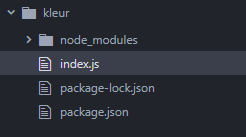
文件夹结构:
使用模块: 安装完成后,我们需要使用 require 函数导入 kleur 模块,然后使用它来操作输出中不同文本的颜色。
const kleur = require('kleur');
运行: 成功导入并编写代码后,我们可以运行文件中编写的代码。使用给定的命令来运行 JavaScript 代码。 在这个命令中,index.js 是 JavaScript 文件名。
$ node index.js
以下是我们如何使用 kleur 模块的一些示例:
示例 1:
// Require the 'kleur' module
const kleur = require('kleur');

// Create variables with colored strings
const red = kleur.green().bold('GeeksforGeeks');
const blueBg = kleur.bgBlue(
    'How to use Kleur module in node.js ?');

// Log the colored strings to the console
console.log(red);
console.log(blueBg);
console.log(boldYellow);
console.log(greenUnderline);
输出:
示例 2:
const { bold, green } = require('kleur');

console.log(bold().red('this is a bold red message'));
console.log(bold().italic(
    'this is a bold italicized message'));
console.log(bold().yellow().bgRed().italic(
    'this is a bold yellow italicized message'));
console.log(green().bold().underline(
    'this is a bold green underlined message'));
输出: