Pandas 原地更新数据技巧
发布日期 :2021-05-07 11:44:46 UTC
访问量: 10 次浏览
如何使用Pandas的 apply() 来代替
在这篇文章中,我们将介绍如何在 Python 中使用 Pandas 的 apply() 方法实现类似 inplace 的效果。
在 Python 中,apply() 函数类似于 map() 函数。它接受一个函数作为输入,并将其应用于整个 DataFrame。 如果你处理的是表格形式的数据,你需要选择你的函数应该作用于哪个轴(0 代表列;1 代表行)。
pandas apply() 方法是否有一个 inplace 参数
不,apply() 方法不包含 inplace 参数,不像以下这些 pandas 方法有 inplace 参数:
df.drop()df.rename(inplace=True)fillna()dropna()sort_values()reset_index()sort_index()rename()
inplace 参数的含义
当 inplace=True 时,数据被就地编辑,这意味着方法不返回任何值,原始 DataFrame 将被直接更新。 当 inplace=False 时(默认情况),操作会执行并返回对象的副本,原始数据保持不变。
例1:单列使用 apply() 实现就地修改
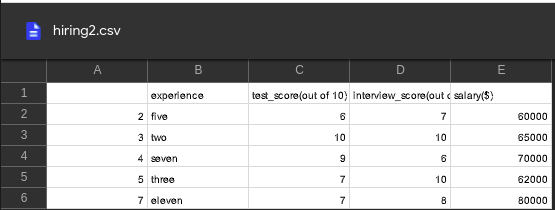
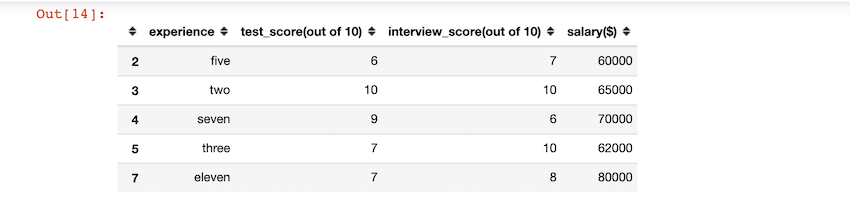
在下面的代码中,我们首先导入了 pandas 包,并使用 pd.read_csv() 导入了 CSV 文件。 导入后,我们在数据框的 experience 列上使用 apply() 函数,将该列的字符串转换成大写字母。
使用的 CSV 文件:
 来代替?")
import pandas as pd

# importing our dataset
df = pd.read_csv('hiring.csv')
# viewing the dataFrame
print(df)

# we change the case of all the strings
# in experience column to uppercase
df['experience'] = df['experience'].apply(str.upper)

# viewing the modified column
print(df['experience'])
输出:
 来代替?")
0      FIVE
1       TWO
2     SEVEN
3     THREE
4    ELEVEN
Name: experience, dtype: object
例2:多列使用 apply() 实现就地修改
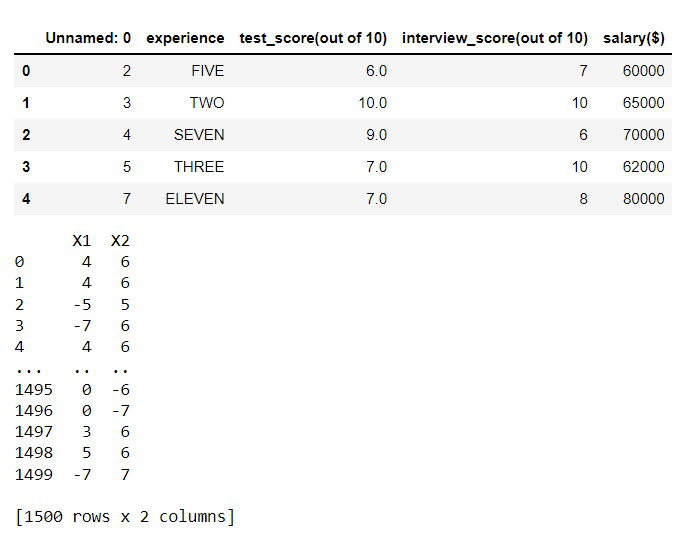
在这个例子中,我们在多个列上使用 apply() 方法,将列的数据类型从 float 改为 int。
import pandas as pd
import numpy as np

# importing our dataset
data = pd.read_csv('cluster_blobs.csv')

# viewing the dataFrame
print(data)

# we convert the datatype of columns from float to int.
data[['X1', 'X2']] = data[['X1', 'X2']].apply(np.int64)

# viewing the modified column
print(data[['X1', 'X2']])
输出:
 来代替?")
例3:应用于所有列的 apply() inplace
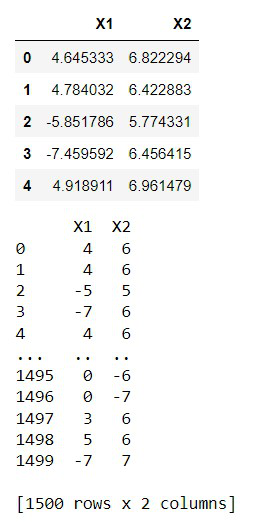
在这个例子中,我们对整个 DataFrame 使用 apply() 方法,将所有列的数据类型从 float 改为 int。
import pandas as pd
import numpy as np

# importing our dataset
data = pd.read_csv('cluster_blobs.csv')

# viewing the dataFrame
print(data)

# we convert the datatype of
# columns from float to int.
data = data.apply(np.int64)

# viewing the modified column
print(data)
输出:
 来代替?")
本文链接 :Pandas 原地更新数据技巧