TensorFlow 加载与处理花卉数据集
发布日期 :2023-05-13 16:37:32 UTC
访问量: 10 次浏览
如何用Tensorflow来加载花的数据集并进行处理
Tensorflow花卉数据集是一个大型的花卉图像数据集。 在这篇文章中,我们将看到,我们如何使用Tensorflow来加载花卉数据集并对其进行处理。
让我们从导入必要的库开始。这里我们要使用 tensorflow\_dataset 库来加载数据集。 它是一个公共数据集库,可以随时与TensorFlow一起使用。 如果你没有下面提到的任何一个库,你可以使用pip命令来安装它们,例如,要安装 tensorflow\_datasets 库,你需要写下以下命令。
pip install tensorflow-datasets
# Importing libraries
import tensorflow as tf
import numpy as np
import pandas as pd
import tensorflow_datasets as tfds
为了导入花的数据集,我们将使用tfds.load()方法。 该方法用于将命名的数据集加载到 tf.data.Dataset 中,该数据集是用 name 参数提供的。花卉数据集的名称是 tf\_flowers 。 在该方法中,我们还使用split参数对数据集进行了分割, training\_set 占到了数据集的70%,其余的归入 test\_set 。
(training_set, test_set), info = tfds.load(
    'tf_flowers',
    split=['train[:70%]', 'train[70%:]'],
    with_info=True,
    as_supervised=True,
)
如果我们使用print命令打印Tensorflow为数据集提供的信息,我们将得到以下输出。
print(info)
输出:
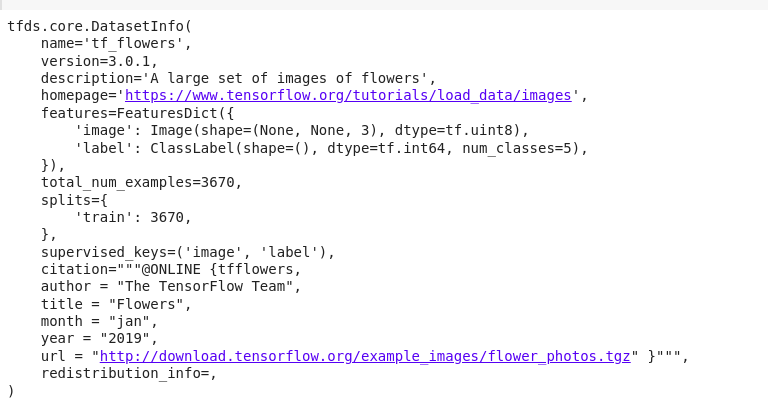
花卉数据集包含3670张花卉图像,按以下方式分布在 training\_set 和 test\_set 中。
print("Training Set Size: %d" % training_set.cardinality().numpy())
print("Test Set Size: %d" % test_set.cardinality().numpy())
输出:
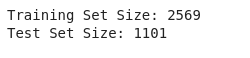
花卉数据集由5种不同种类的花卉图像组成。
num_classes = info.features['label'].num_classes
print("Number of Classes: %d" % num_classes)
输出:

现在让我们把数据集中的一些图像可视化。下面的代码显示了数据集中的前5张图片。
import matplotlib.pyplot as plt

ctr = 0
plt.rcParams["figure.figsize"] = [30, 15]
plt.rcParams["figure.autolayout"] = True

for image, label in training_set:
    image = image.numpy()
    plt.subplot(1, 5, ctr+1)
    plt.title('Label {}'.format(label))
    plt.imshow(image, cmap=plt.cm.binary)
    ctr += 1
    if ctr == 5:
        break

plt.show()
输出:

如果你仔细观察,不同的图像并没有相同的尺寸,而是有不同的尺寸。 我们可以通过打印我们刚才可视化的图像的尺寸来验证这一点。下面的代码完成了这个目标。
for i, example in enumerate(training_set.take(5)):
    shape = example[0].shape
    print("Image %d -> shape: (%d, %d) label: %d" %
          (i, shape[0], shape[1], example[1]))
输出:
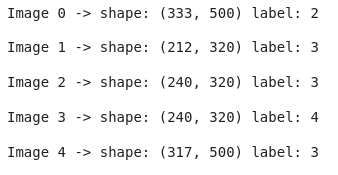
正如你可能观察到的,各种图像的形状是不同的。
然而,为了将这个数据集输入机器学习模型,我们需要让所有的图像都有相同的尺寸。 为此,我们将对图像进行一些预处理。也就是说,我们将把所有的图像调整到一个固定的大小,在这种情况下是224,并对图像进行标准化处理,使每个像素的值都在0到1的范围内。 下面这段代码达到了预期目的。
IMG_SIZE = 224

def format_image(image, label):

    image = tf.image.resize(image, (IMG_SIZE, IMG_SIZE))

    # Normalisation
    image = image/255.0
    return image, label

batch_size = 32
training_set = training_set.shuffle(300).map(
    format_image).batch(batch_size).prefetch(1)
test_set = test_set.map(format_image).batch(batch_size).prefetch(1)
打印这两个数据集可以发现,数据集中的每张图片现在都被调整了大小,每张图片的大小都是(224,224,3)。
print(training_set)
print(test_set)
输出:

现在你可以把这个数据集送入任何适当的机器学习模型。
为了演示的目的,我们将使用修改过的MobileNet版本来训练这个数据集。 以下是描述模型、优化器、损失函数和训练模型时使用的度量的代码片段。
def getModel(image_shape):
    mobileNet = tf.keras.applications.mobilenet.MobileNet(image_shape)
    X = mobileNet.layers[-2].output
    X_output = tf.keras.layers.Dense(1,
                                     activation='relu')(X)
    model = tf.keras.models.Model(inputs=mobileNet.input,
                                  outputs=X_output)
    return model

model = getModel((IMG_SIZE, IMG_SIZE, 3))

optimizer = tf.keras.optimizers.Adam()
loss = 'mean_squared_error'
model.compile(optimizer=optimizer,
              loss=loss,
              metrics='accuracy')

epochs = 5
model.fit(training_set, epochs=epochs,
          validation_data=test_set)
输出:

该模型现在在数据集上的表现很差。你可以对模型进行更多次数的训练,并对输出变量使用单次编码来提高准确率。