matplotlib ``xticks()`` 函数使用教程
发布日期 :2021-04-09 20:55:03 UTC
访问量: 15 次浏览
matplotlib.pyplot.xticks()函数
matplotlib.pyplot.xticks() 函数
matplotlib库的pyplot模块中的 xticks() 函数用于获取和设置x轴的当前刻度位置和标签。
语法:
matplotlib.pyplot.xticks(ticks=None, labels=None, **kwargs)
参数:该方法接受以下参数说明:
ticks:xtick位置列表(可选)。如果传递空列表,将删除所有xtickslabels:放置在给定刻度位置的标签(可选)**kwargs:Text属性,用于控制标签的外观
返回值:
locs:返回xtick位置列表labels:返回标签Text对象的列表
返回 (locs, labels) 元组
下面的例子演示了 matplotlib.pyplot.xticks() 函数在 matplotlib.pyplot 中的作用:
示例1
# Implementation of matplotlib.pyplot.xticks()
# function

import numpy as np
import matplotlib.pyplot as plt

x = [1, 2, 3, 4]
y = [95, 38, 54, 35]
labels = ['Geeks1', 'Geeks2', 'Geeks3', 'Geeks4']

plt.plot(x, y)

# You can specify a rotation for the tick
# labels in degrees or with keywords.
plt.xticks(x, labels, rotation ='vertical')

# Pad margins so that markers don't get
# clipped by the axes
plt.margins(0.2)

# Tweak spacing to prevent clipping of tick-labels
plt.subplots_adjust(bottom = 0.15)
plt.show()
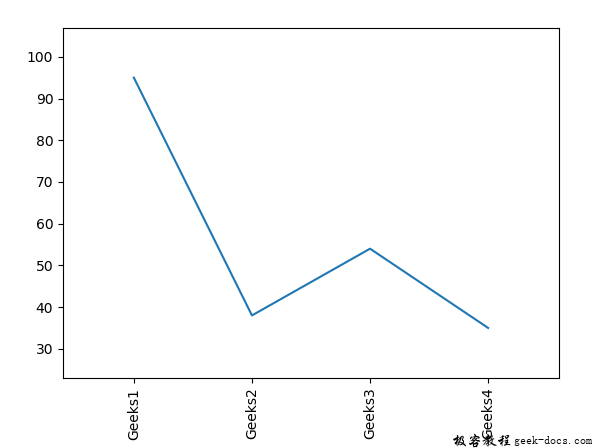
输出:
示例2
# Implementation of matplotlib.pyplot.xticks()
# function

import matplotlib.pyplot as plt

from mpl_toolkits.axes_grid1.inset_locator import inset_axes, zoomed_inset_axes

def get_demo_image():
    from matplotlib.cbook import get_sample_data
    import numpy as np
    f = get_sample_data("axes_grid / bivariate_normal.npy",
                        asfileobj = False)
    z = np.load(f)

    # z is a numpy array of 15x15
    return z, (3, 19, 4, 13)


fig, ax = plt.subplots(figsize =[5, 4])

Z, extent = get_demo_image()

ax.set(aspect = 1,
       xlim =(0, 65),
       ylim =(0, 50))


axins = zoomed_inset_axes(ax, zoom = 2,
                          loc ='upper right')

im = axins.imshow(Z, extent = extent,
                  interpolation ="nearest",
                  origin ="upper")

plt.xlabel('X-axis')
plt.ylabel('Y-axis')

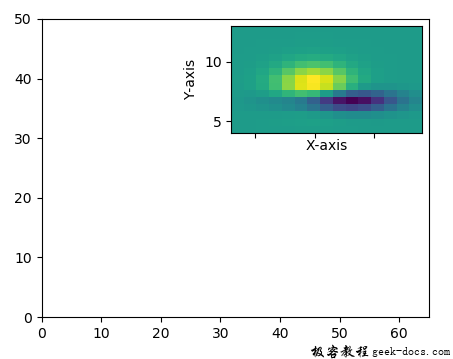
plt.xticks(visible = False)
plt.show()
输出: