Mongoose ``Query.prototype.selectedInclusively()`` 方法使用详解
发布日期 :2019-06-19 02:51:30 UTC
访问量: 10 次浏览
Mongoose
Mongoose是一个用于MongoDB的对象数据建模(ODM)库。它定义了强类型的模式,具有默认值和模式验证,这些后来被映射到一个MongoDB文档中。
Mongoose Query API的 selectedInclusively() 方法 用于确定是否使用Mongoose select() 查询进行了包含选择。让我们通过一些示例更详细地了解这个方法。
语法:
Query.prototype.selectedInclusively()
参数:不接受任何参数。
返回类型:返回一个布尔值。
创建Node应用并安装Mongoose:
步骤1:使用以下命令创建一个 Node 应用:
mkdir folder_name
cd folder_name
npm init -y
touch main.js
步骤2:创建 Node.js 应用程序后,使用以下命令安装所需模块:
npm install mongoose
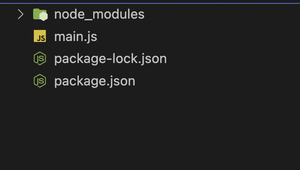
项目结构: 以下是它的外观。
 函数")
函数")
数据库使用MongoDB Compass进行GUI表示:当前,集合中没有数据。
 函数")
函数")
示例1: 在这个示例中,我们将使用查询API的 selectedInclusively() 方法来确定是否已选择“age”。
文件名: main.js
const mongoose = require('mongoose')

// Database connection
mongoose.connect(
    'mongodb://localhost:27017/query-helpers',
    {
        dbName: 'event_db',
        useNewUrlParser: true,
        useUnifiedTopology: true
    }, err => err ? console.log(err)
        : console.log('Connected to database'));

const personSchema = new mongoose.Schema({
    name: {
        type: String,
    },
    age: {
        type: Number,
    }
});

const personsArray = [
    {
        name: 'Luffy',
        age: 22
    },
    {
        name: 'Nami',
        age: 30
    },
    {
        name: 'Zoro',
        age: 15
    }
]

const Person = mongoose.model('Person', personSchema);

(async () => {
    const query = Person.find()

    console.log(query.selectedInclusively());
    query.select('age')
    console.log(query.selectedInclusively());
})()
运行应用程序的步骤: 从项目的根目录中使用以下命令运行应用程序:
node main.js
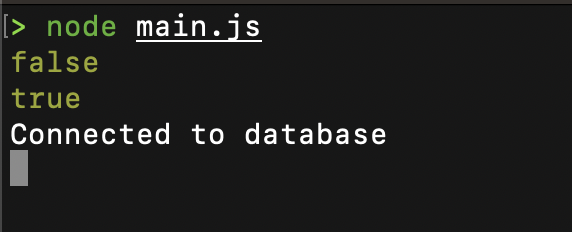
输出: 此时 selectedInclusively() 在 select('age') 之前返回 false,之后返回 true,表明 age 字段已被包含选择。
 函数")
函数")
使用MongoDB Compass的数据库的GUI表示:
 函数")
函数")
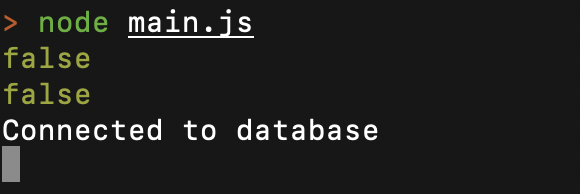
示例2: 在这个示例中,我们将使用Query API的 selectedInclusively() 方法来确定是否选择了“age”。在这里,我们首先选择然后取消选择“age”,这将使两个控制台日志都打印出“false”作为响应。
文件名: main.js
const mongoose = require('mongoose')

// Database connection
mongoose.connect(
    'mongodb://localhost:27017/query-helpers',
    {
        dbName: 'event_db',
        useNewUrlParser: true,
        useUnifiedTopology: true
    }, err => err ? console.log(err)
        : console.log('Connected to database'));

const personSchema = new mongoose.Schema({
    name: {
        type: String,
    },
    age: {
        type: Number,
    }
});

const personsArray = [
    {
        name: 'Luffy',
        age: 22
    },
    {
        name: 'Nami',
        age: 30
    },
    {
        name: 'Zoro',
        age: 15
    }
]

const Person = mongoose.model('Person', personSchema);

(async () => {
    const query = Person.find()

    console.log(query.selectedInclusively());
    query.select('age')
    query.select('-age')
    console.log(query.selectedInclusively());
})()
运行应用程序的步骤:从项目的根目录中使用以下命令运行应用:
node main.js
输出: 由于先执行了 select('age') 后又执行了 select('-age') 取消选择,因此两次调用 selectedInclusively() 均返回 false。
 函数")
函数")
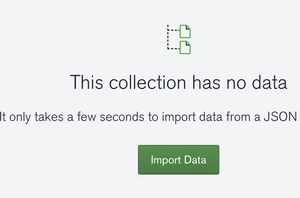
使用MongoDB Compass将数据库的GUI表示:
 函数")
函数")
参考: https://mongoosejs.com/docs/api/query.html#query_Query-selectedInclusively