jQuery animate 实现 div 鼠标悬停宽高动画教程
发布日期 :2023-01-04 12:02:42 UTC
访问量: 16 次浏览
如何使用jQuery在鼠标悬停时对div的宽度和高度进行动画处理
为了在鼠标悬停时对div的宽度和高度进行动画处理,我们可以使用jQuery的 animate() 方法以及 mouseenter() 和 mouseleave() 方法。
.animate()方法:animate()方法用CSS样式改变元素的状态。
语法:
$(selector).animate({styles}, para1, para2, para3);
.mouseenter()方法:mouseenter()方法在鼠标指针移动到选定的元素上时工作。
语法:
$(selector).mouseenter(function)
.mouseleave()方法:mouseleave()方法在鼠标指针离开选定的元素时发挥作用。
语法:
$(selector).mouseleave(function)
步骤:
- 使用
$(selector).width()方法存储要做动画的div元素的实际宽度和高度。 - 使用
mouseenter()和mouseleave()方法处理鼠标指针事件。 - 当鼠标指针在div元素上时,使用
animate()方法将宽度或高度样式属性改为div元素的新值。 - 将div元素的宽度或高度样式属性改为先前存储的值。
实例1: 使用jQuery在悬停时对div宽度进行动画处理。
<!DOCTYPE html>
<html>

<head>
    <title>
        How to animate div width and height
        on mouse hover in jQuery ?
    </title>

    <script src=
"https://code.jquery.com/jquery-1.12.4.min.js">
    </script>

    <style type="text/css">
        .box {
            float:center;
            overflow: hidden;
            background: #32a852;
            width: 400px;
            padding: 0px;
        }

        /* Add padding and border to inner
        content for better animation effect */
        .box-inner {
            width: 400px;
            padding: 0px;
            border: 1px solid #000000;
        }
    </style>
</head>

<body>
    <center>
        <h1 style = "color:green;" >
            GeeksForGeeks
        </h1>

        <h3>
            jQuery | How to animate div
            width on mouse hover?
        </h3>
        <hr>

        <div class="box">
            <div class="box-inner">
                <h4>.animate() method is used</h4>

                <p>
                    GEEKSFORGEEKS - A computer
                    science portal for geeks.
                </p>
            </div>
        </div>
        <hr>

        <script type="text/javascript">
            $(document).ready(function() {
                var divWidth = $(".box").width();

                $(".box").mouseenter(function(){
                    $(this).animate({
                        width: "300"
                    });
                }).mouseleave(function(){
                    $(this).animate({
                        width: divWidth
                    });
                });
            });
        </script>
    </center>
</body>

</html>
输出:
- 当指针位于
div元素上时。
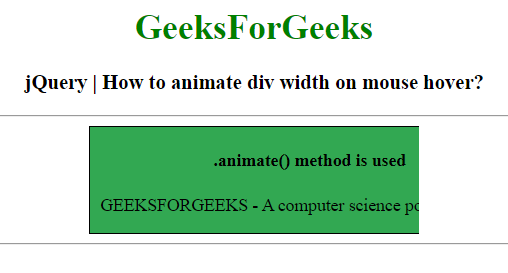 * 当指针不在div元素上时。
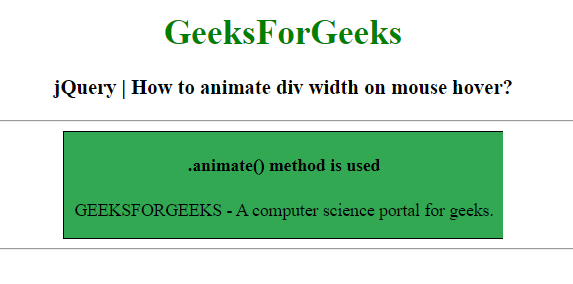
例子2: 使用jQuery在悬停时对div的高度进行动画处理。
<!DOCTYPE html>
<html>

<head>
    <title>
        jQuery | How to animate div width
        and height on mouse hover?
    </title>

    <script src=
"https://code.jquery.com/jquery-1.12.4.min.js">
    </script>

    <style type="text/css">
        .box{
            float:center;
            overflow: hidden;
            background: #32a852;
            width: 400px;
            padding: 0px;
        }

        /* Add padding and border to inner
        content for better animation effect */
        .box-inner{
            width: 400px;
            padding: 0px;
            border: 1px solid #000000;
        }
    </style>
</head>

<body>
    <center>
        <h1 style = "color:green;" >
            GeeksForGeeks
        </h1>

        <h3>
            jQuery | How to animate div
            height on mouse hover?
        </h3>
        <hr>

        <div class="box">
            <div class="box-inner">
                <h4>.animate() method is used</h4>

                <p>
                    GEEKSFORGEEKS - A computer
                    science portal for geeks.
                </p>
            </div>
        </div><hr>

        <script type="text/javascript">
            $(document).ready(function(){
                var divHeight = $(".box").height();
                $(".box").mouseenter(function(){
                    $(this).animate({
                        height: "250"
                    });
                }).mouseleave(function(){
                    $(this).animate({
                        height: divHeight
                    });
                });
            });
        </script>
    </center>
</body>

</html>
输出:
- 当指针位于div元素上时。
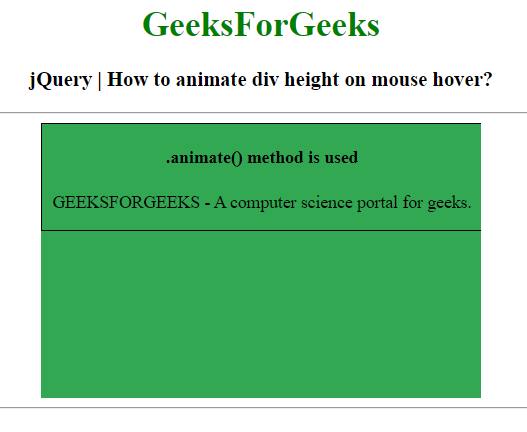 * 当指针不在div元素上时。