PyQt5 日历日期编辑弹窗设置
发布日期 :2023-01-30 18:08:17 UTC
访问量: 10 次浏览
在这篇文章中,我们将看到如何启用/禁用 QCalendarWidget 的日期编辑弹窗。 默认情况下,日期编辑弹出窗口是启用的,日期编辑在外观上比 QDateEdit 更简单,但允许用户使用左右光标键在不同的字段之间导航,使用上下光标键增加和减少单个字段,并使用数字键直接输入值。
下面是弹出的日期编辑界面的样子:
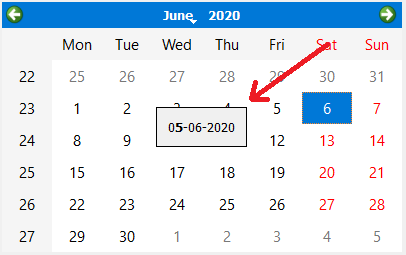
为了做到这一点,我们将使用 QCalendarWidget 对象的 setDateEditEnabled 方法。
语法: calendar.setDateEditEnabled(True)
参数:它以bool作为参数
返回:它返回无
下面是实现
# importing libraries
from PyQt5.QtWidgets import *
from PyQt5 import QtCore, QtGui
from PyQt5.QtGui import *
from PyQt5.QtCore import *
import sys


class Window(QMainWindow):

    def __init__(self):
        super().__init__()

        # setting title
        self.setWindowTitle("Python ")

        # setting geometry
        self.setGeometry(100, 100, 650, 400)

        # calling method
        self.UiComponents()

        # showing all the widgets
        self.show()

    # method for components
    def UiComponents(self):

        # creating a QCalendarWidget object
        self.calendar = QCalendarWidget(self)

        # setting geometry to the calendar
        self.calendar.setGeometry(50, 10, 400, 250)

        # setting cursor
        self.calendar.setCursor(Qt.PointingHandCursor)

        # enabling the date edit popup
        self.calendar.setDateEditEnabled(True)


# create pyqt5 app
App = QApplication(sys.argv)

# create the instance of our Window
window = Window()


# start the app
sys.exit(App.exec())
本文链接 :PyQt5 日历日期编辑弹窗设置