KML 和 GeoJSON 之间的转换:综合指南
发布日期 : 2023-08-30 00:51:25 UTC
访问量: 874 次浏览
地理空间数据通常以各种格式表示, 其中 KML(Keyhole 标记语言)和 GeoJSON 是最流行的两种格式。 本指南将提供有关使用各种工具和编程语言在这两种格式之间进行转换的分步说明。
分步转换指南
1. 利用 QGIS 在 KML 和 GeoJSON 之间进行转换:
单个文件转换:
- 打开QGIS;
- 进入
Layer>Add Layer>Add Vector Layer; - 选择源文件(KML 或 GeoJSON);
- 加载图层后,在“图层”面板中右键单击;
- 选择
Export>Save Features As; - 在格式下拉列表中,根据您的转换目标选择 KML 或 GeoJSON;
- 指定文件名和位置;
- 单击
OK。
批量转换:
- 打开
QGIS; - 进入
Processing>Toolbox; - 搜索
Convert format; - 在
Input layer字段中,使用...按钮选择多个文件; - 选择所需的输出格式(KML 或 GeoJSON);
- 指定输出目录;
- 单击
Run。
2. 利用 GDAL 在 KML 和 GeoJSON 之间进行转换:
单个文件转换:
(1)打开命令行或终端;
(2)使用 ogr2ogr 命令:
- 对于 KML 到 GeoJSON:
ogr2ogr -f "GeoJSON" output.geojson input.kml - 对于 GeoJSON 到 KML:
ogr2ogr -f "KML" output.kml input.geojson
批量转换:
(1)导航到包含的文件目录。
(2)使用循环转换所有文件:
- 对于 KML 到 GeoJSON:
for i in *.kml; do ogr2ogr -f "GeoJSON" "${i%.kml}.geojson" "$i"; done - 对于 GeoJSON 到 KML:
for i in *.geojson; do ogr2ogr -f "KML" "${i%.geojson}.kml" "$i"; done
3. 利用 ArcGIS Pro 在 KML 和 GeoJSON 之间进行转换:
单个文件转换:
- 打开 ArcGIS Pro。
- 将源图层添加到地图中。
- 右键单击图层
Data>Export Features。 - 选择所需的格式(KML 或 GeoJSON)并指定输出位置。
- 单击
Save。
批量转换:
- 使用该
Copy Features工具。 - 对于输入,选择多个文件。
- 对于输出,指定目录和格式。
- 运行该工具。
4. 利用 Python 在 KML 和 GeoJSON 之间进行转换:
使用 geopandas 库:
import geopandas as gpd

# For KML to GeoJSON
gdf = gpd.read_file('input.kml')
gdf.to_file('output.geojson', driver='GeoJSON')

# For GeoJSON to KML
gdf = gpd.read_file('input.geojson')
gdf.to_file('output.kml', driver='KML')
批量转换:
import os
import geopandas as gpd

directory = 'path_to_directory'
for filename in os.listdir(directory):
    if filename.endswith('.kml'):
        gdf = gpd.read_file(os.path.join(directory, filename))
        gdf.to_file(os.path.join(directory, filename.replace('.kml', '.geojson')), driver='GeoJSON')
    elif filename.endswith('.geojson'):
        gdf = gpd.read_file(os.path.join(directory, filename))
        gdf.to_file(os.path.join(directory, filename.replace('.geojson', '.kml')), driver='KML')
5. 利用 R 在 KML 和 GeoJSON 之间进行转换:
使用 sf 包:
library(sf)

# For KML to GeoJSON
data <- st_read("input.kml")
st_write(data, "output.geojson")

# For GeoJSON to KML
data <- st_read("input.geojson")
st_write(data, "output.kml")
批量转换:
files <- list.files(path="path_to_directory", pattern="\\.kml$", full.names=TRUE)
for(file in files){
  data <- st_read(file)
  st_write(data, sub(".kml", ".geojson", file))
}

files <- list.files(path="path_to_directory", pattern="\\.geojson$", full.names=TRUE)
for(file in files){
  data <- st_read(file)
  st_write(data, sub(".geojson", ".kml", file))
}
KML 和 GeoJSON 文件格式之间的差异
转换中的潜在挑战:
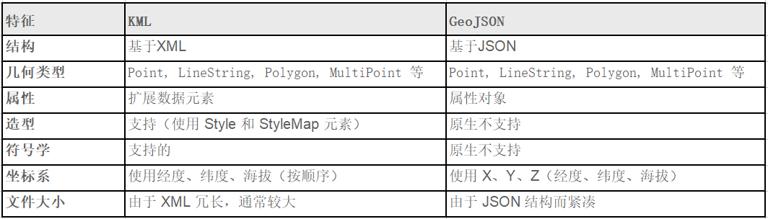
- 几何支持:虽然这两种格式都支持点、线和多边形等基本几何图形, 但 KML 具有独特的功能, 例如 MultiGeometryGeoJSON 中可能没有直接等效的功能, 这可能会导致转换不完整或不完整。
- 属性处理:KML 使用 ExtendedData 元素来存储附加数据, 而 GeoJSON 使用 properties 对象。 不匹配或标签不正确的属性可能会导致转换过程中数据丢失。
- 样式和符号系统:KML 具有对样式和符号系统的内置支持, 允许对要素的显示方式进行详细自定义。 GeoJSON 缺乏原生样式功能, 这意味着 KML 文件中的任何样式在转换为 GeoJSON 时都可能会丢失。
- 坐标系统:KML 使用特定的坐标顺序(经度、纬度、海拔), 而 GeoJSON 使用更传统的 X、Y、Z 顺序。 如果在转换过程中处理不当, 这可能会导致要素错位。
- 文件结构:由于 XML 的冗长, KML 文件通常比其 GeoJSON 对应文件大。 从 GeoJSON 转换为 KML 时, 这可能会导致转换时间更长和输出文件更大。
- 有损转换:并非一种格式的所有功能和属性在另一种格式中都具有直接等效项。 这可能会导致转换过程中数据或细节丢失, 尤其是从 KML 转换为 GeoJSON 时。
实用建议:
- 转换前检查:在转换之前, 检查源文件以识别可能带来挑战的任何独特或复杂功能, 这可以帮助预测和解决潜在问题。
- 使用可靠的转换工具:QGIS 和 GDAL 等工具维护良好并定期更新, 确保转换准确高效。
- 转换后验证:转换后, 验证输出文件以确保所有功能和属性均已正确传输, 这可以使用地理空间软件或在线验证工具来完成。
- 备份原始数据:在转换之前始终保留原始文件的备份, 以防止任何不可逆转的数据丢失。
比较:
- 结构:KML 基于 XML,使其更加冗长和复杂, 而 GeoJSON 的 JSON 结构更加紧凑且易于阅读。
- 几何类型:两种格式都支持多种几何形状, 但 KML 的 MultiGeometry 功能可能会在转换过程中带来挑战。
- 属性:KML 的 ExtendedData 元素提供了数据存储的灵活性, 而 GeoJSON 的 properties 对象提供了更结构化的方法。
- 样式:KML 的内置样式功能比 GeoJSON 提供更多的视觉自定义功能, GeoJSON 缺乏本机样式功能。
- 坐标系:如果处理不当, 两种格式之间的坐标顺序差异可能会导致转换错误。
经常问的问题:
可以在 GeoJSON 中保留 KML 文件的样式吗?
不,GeoJSON 本身不支持样式。 但是,可以将样式信息存储为属性并使用外部库在转换后应用它们。
为什么我的要素在转换后会错位?
这可能是由于 KML 和 GeoJSON 之间的坐标顺序不同造成的。 确保您使用的是可靠的转换工具, 可以正确处理这种差异。
有没有办法批量转换多个文件?
是的,GDAL 和 QGIS 等工具提供批量转换功能。 您还可以使用 Python 或 R 中的脚本进行批量转换。
转换过程中我会丢失任何数据吗?
虽然这两种格式都很强大, 但由于功能、属性和样式的差异, 可能会出现有损转换。 始终验证您的输出并保留原始数据的备份。
哪种格式更适合 Web 应用程序?
由于结构紧凑且与许多 JavaScript 库兼容, GeoJSON 通常是 Web 应用程序的首选。
本文链接 :KML 和 GeoJSON 之间的转换:综合指南