HTML输出格式
默认的HTML输出是一系列有标题的表,每个表用于不同的层。下面的示例显示了Tiger NY basemap的默认输出(包括在上面引用的版本中以及以后的版本中)。
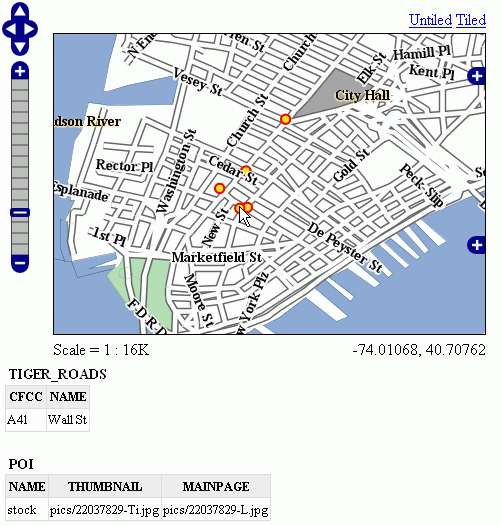
默认输出
标准模板
以下内容假定您已经熟悉了FreeMarker模板。如果您不是,请阅读 自由标记模板 教程和 KML Placemark模板 页面,其中有一些简单的示例。
默认输出由标准模板生成,标准模板有三个:
header.ftlcontent.ftlfooter.ftl
这个 标题模板 只调用一次,通常包含HTML页面的开头和一些CSS。默认的头模板如下所示(如您所见,它是完全静态的,实际上它没有提供任何可以展开的变量)::
<#--
Header section of the GetFeatureInfo HTML output. Should have the <head> section, and
a starter of the <body>. It is advised that eventual css uses a special class for featureInfo,
since the generated HTML may blend with another page changing its aspect when using generic classes
like td, tr, and so on.
-->
<html>
  <head>
    <title>GeoServer GetFeatureInfo output</title>
  </head>
  <style type="text/css">
        table.featureInfo, table.featureInfo td, table.featureInfo th {
                border:1px solid #ddd;
                border-collapse:collapse;
                margin:0;
                padding:0;
                font-size: 90%;
                padding:.2em .1em;
        }
        table.featureInfo th{
            padding:.2em .2em;
                text-transform:uppercase;
                font-weight:bold;
                background:#eee;
        }
        table.featureInfo td{
                background:#fff;
        }
        table.featureInfo tr.odd td{
                background:#eee;
        }
        table.featureInfo caption{
                text-align:left;
                font-size:100%;
                font-weight:bold;
                text-transform:uppercase;
                padding:.2em .2em;
        }
  </style>
  <body>
这个 页脚模板 与此类似,用于正确关闭HTML文档的静态模板:
<#--
Footer section of the GetFeatureInfo HTML output. Should close the body and the html tag.
-->
  </body>
</html>
这个 内容模板 是将功能对象转换为实际HTML表的功能。这个模板被多次调用:每次它都被一个不同的特性集合提供,这些特性都具有相同的类型。在上面的示例中,已为道路调用了一次模板,为兴趣点(POI)调用了一次模板。以下是模板源:
<#--
Body section of the GetFeatureInfo template, it's provided with one feature collection, and
will be called multiple times if there are various feature collections
-->
<table class="featureInfo">
  <caption class="featureInfo">${type.name}</caption>
  <tr>
<#list type.attributes as attribute>
  <#if !attribute.isGeometry>
    <th >${attribute.name}</th>
  </#if>
</#list>
  </tr>

<#assign odd = false>
<#list features as feature>
  <#if odd>
    <tr class="odd">
  <#else>
    <tr>
  </#if>
  <#assign odd = !odd>

  <#list feature.attributes as attribute>
    <#if !attribute.isGeometry>
      <td>${attribute.value}</td>
    </#if>
  </#list>
  </tr>
</#list>
</table>
<br/>
正如您所看到的,有第一个循环扫描类型并将其属性输出到表头,然后第二个循环遍历集合中的每个要素(Feature)。从每个要素访问属性集合以转储属性值。在这两种情况下,都会跳过几何图形,因为将它们包含在表格报告中没有多大意义。在表构建代码中,您还可以看到如何为奇数行赋予“ODD”类,以便它们的背景颜色提高可读性。
自定义模板
那么,如果要重写自定义模板,您需要做什么?好吧,这取决于您想要重写哪个模板。
header.ftl 和 footer.ftl 是独立于类型的,因此如果要重写它们,必须放置一个名为 header.ftl 或 footer.ftl 在 templates 目录,位于GeoServer中 地理服务器数据目录 . 相反地, content.ftl 可以是泛型的,也可以是特定于要素类型的。
例如,假设您希望特性信息输出具有项目符号列表外观,并且希望将其应用于所有GetFeatureInfo HTML输出。在这种情况下,你会放弃以下 content.ftl 在模板目录中:
<ul>
<#list features as feature>
  <li><b>Type: ${type.name}</b> (id: <em>${feature.fid}</em>):
  <ul>
  <#list feature.attributes as attribute>
    <#if !attribute.isGeometry>
      <li>${attribute.name}: ${attribute.value}</li>
    </#if>
  </#list>
  </ul>
  </li>
</#list>
</ul>
有了这个模板,输出将是:
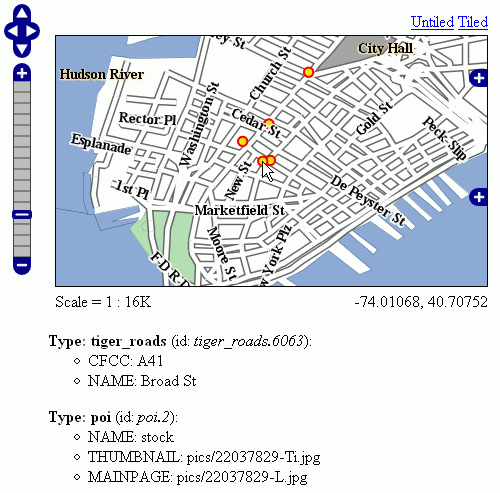
项目符号列表输出
查看输出,我们注意到兴趣点功能引用了图像文件,我们知道这些文件存储在 demo_app/pics 路径。因此,我们可以提供一个POI特定的覆盖,实际加载图像。
这很简单:只需将以下模板放在feature type文件夹中,在本例中是 workspaces/topp/DS_poi/poi (如果您有固定的IP地址,您应该引用您的Internet可见服务器地址而不是本地主机,或者它的IP地址)::
<ul>
<#list features as feature>
  <li><b>Point of interest, "${feature.NAME.value}"</b>: <br/>
  <img src="http://localhost:8080/geoserver/popup_map/${feature.THUMBNAIL.value}"/>
  </li>
</#list>
</ul>
使用此附加模板,输出为:
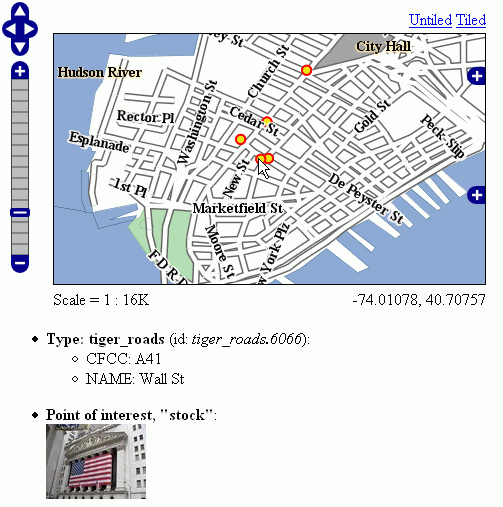
用缩略图输出
如您所见,道路仍然使用通用模板,而POI使用自己的自定义模板。
高级格式设置
这个 value 要素属性值的属性由Geoserver在中提供 String 窗体,根据属性值的实际类型使用合理的默认值。如果需要访问原始属性值才能应用自定义格式(例如,应用于输出 "Enabled" 或 "Disabled" 对于给定的布尔属性,而不是默认的 true/false ,您可以只使用 rawValue 属性,而不是 value 。例如: ${{attribute.rawValue?string("Enabled", "Disabled")}} 与其只是 ${{attribute.value}} 。
自动转义
自动转义可用于转义特殊字符,以便它们在客户端正确显示并防止注入。Geoserver管理员可以在全球或每个虚拟服务的基础上启用或禁用针对HTML输出格式的FreeMarker模板值的自动转义。模板作者能够覆盖WMS服务设置,以启用或禁用基于每个模板、每个块或每个值的转义。看见 Auto-escaping <https://freemarker.apache.org/docs/dgui_misc_autoescaping.html> 以获取更多信息。
访问静态方法
可以从Freemarker模板中调用静态方法和变量来启用更复杂的模板。但是请注意,通常静态方法调用是一种安全隐患,它可能被用来制造有害的东西,特别是当模板作者不能完全信任时。因此,默认情况下,此功能被禁用。配置参数 org.geoserver.htmlTemplates.staticMemberAccess 必须指定以启用它,例如作为系统属性。参数采用逗号分隔的完全限定类名列表。GeoServer允许从模板中使用这些类的简单、不限定的类名访问这些类的静态成员,如下例所示。
以下系统属性启用选择性访问::
-Dorg.geoserver.htmlTemplates.staticMemberAccess=java.lang.String
这将公开的静态成员 java.lang.String 使用变量名 String 在模板中,可以在模板中使用,如下所示:
<ul>
<#list features as feature>
  <li>${feature.NAME.value}: ${String.format("%.2f €", feature.AMOUNT.rawValue)}
  </li>
</#list>
</ul>
如果授予对具有相同简单名称的多个类的访问权,后面指定的类将以数字后缀公开。例如在指定 -Dorg.geoserver.htmlTemplates.staticMemberAccess=java.lang.String,com.acme.String ,静力学 java.lang.String 将暴露为 String while静力学 com.acme.String 将暴露为 String2 等等。
也可以通过指定 * 如下一个例子所示。
以下系统属性启用无限制访问::
-Dorg.geoserver.htmlTemplates.staticMemberAccess=*
在这种情况下,GeoServer公开了 statics 可以在模板中使用的变量访问静态成员,如下所示:
<#assign String=statics['java.lang.String']>
<ul>
<#list features as feature>
  <li>${feature.NAME.value}: ${String.format("%.2f €", feature.AMOUNT.rawValue)}
  </li>
</#list>
</ul>
备注
如果您可以完全信任您的作者,仅当您可以不受限制地访问模板时,才建议您使用上述模板。